


5 AI Prompts Every Marketer Should Know (and How to Use Them in Benchmark Email)

Let’s be honest: writing emails isn’t always easy. There’s a special kind of stress that comes from staring at a blank email draft.
You know what you want to say, but the words just don’t come out right. Or worse, they come out stiff, repetitive, or a little too “marketing speak.”
We’ve all been there.
That’s why Benchmark Email built Smart Text, your built-in AI writing assistant designed to make creating (and improving) emails faster, easier, and a lot less intimidating.
Unlike complicated third-party AI tools, Smart Text lives right inside your email builder. It understands context, tone, and structure, so you can move from “drafting forever” to “sending with confidence” in minutes.
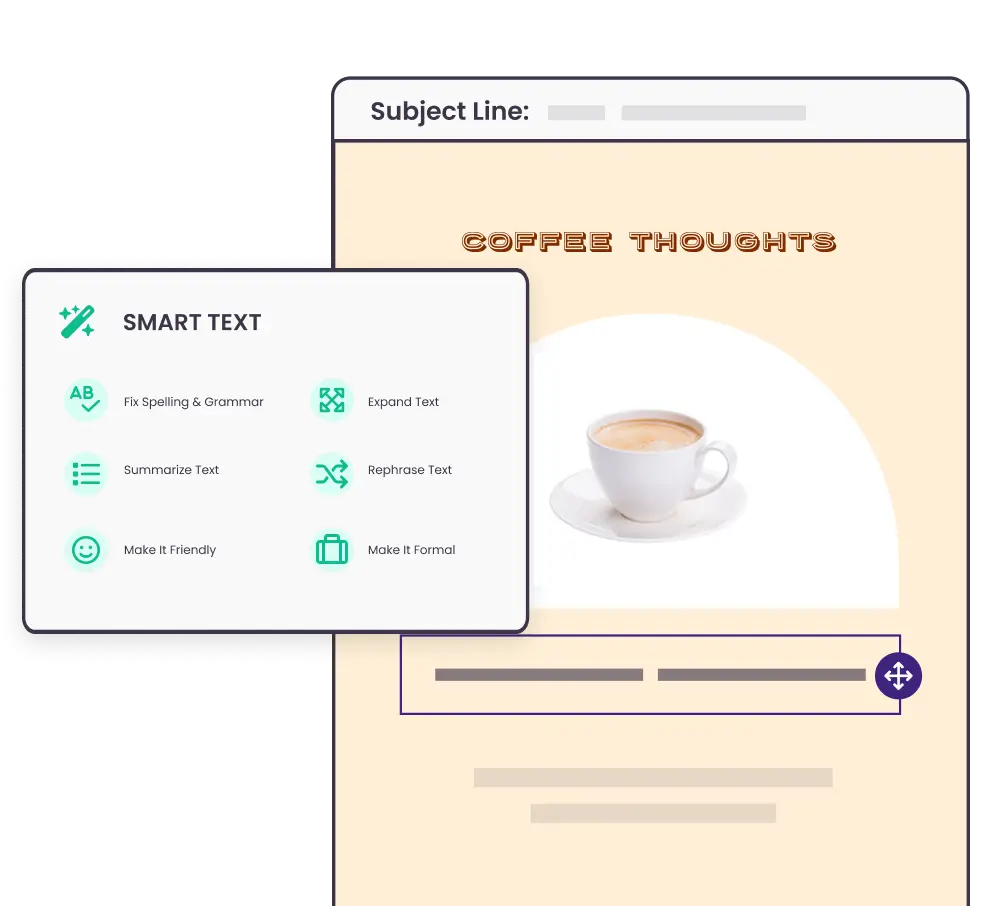
And the best part? You don’t have to be an AI expert to use it. You just need a few smart prompts.
Here are five easy, time-saving prompts every marketer should know, whether you’re polishing a final send or just trying to get started.
Prompt #1: “Write three subject line ideas for this email.”
Let’s start with the hardest (and most important) part of any campaign: the subject line.
Subject lines are your first impression, and your open rate depends on them. But when you’ve written a dozen in a row, it’s easy to run out of ideas. That’s where Smart Text comes in.
Simply highlight your draft or enter your email body, then ask Smart Text:
“Write three subject line ideas for this email.”
Smart Text will instantly generate short, catchy subject lines tailored to your content and tone.
Pro Tip: Want to tweak the vibe? Try adding a tone:
- “Write three friendly subject line ideas…”
- “Write three professional subject line ideas…”
- “Write three playful subject line ideas…”
You’ll not only save time, but you’ll also get fresh inspiration from angles you might not have considered.
Prompt #2: “Make this sound more natural.”
Sometimes your draft just feels… off. Maybe it’s too stiff, too formal, or just doesn’t sound like you. That’s where this magic phrase comes in:
“Make this sound more natural.”
Smart Text takes your existing copy and rephrases it in a conversational, human way, without stripping away your meaning.
Example:
❌ “Please be advised that our upcoming event will commence promptly at 9:00 a.m.”
✅ “Our next event kicks off at 9 a.m.—hope to see you there!”
Small changes, big difference.
Benchmark Tip: Use this prompt when polishing confirmation messages, footers, or automated responses. It’s an easy way to make every touchpoint feel warm and human—without rewriting from scratch.
Prompt #3: “Fix awkward phrasing and tighten this paragraph.”
Sometimes your draft technically works, but something about it feels clunky. That’s where editing can eat up precious time. Instead of manually rewriting every sentence, just highlight the section and ask Smart Text to:
“Fix awkward phrasing and tighten this paragraph.”
Smart Text will smooth out your writing while preserving your voice.
Example:
❌ “We’re extremely excited to be announcing the fact that our new feature is now officially available for use!”
✅ “We’re excited to announce our new feature is officially live!”
Clean, confident, and clear in just one click.
Bonus Tip: You can use this prompt for entire emails before sending. Think of it like an instant proofreader with a great sense of style.
Prompt #4: “Reword this for a friendlier tone.”
Tone can be tricky, especially when you’re writing for different audiences. Too formal, and you risk sounding cold. Too casual, and you might lose credibility.
That’s why one of the most powerful prompts in Smart Text is:
“Reword this for a friendlier tone.”
Smart Text will instantly rephrase your copy to sound approachable, confident, and human. Just the way Benchmark Email’s own tone is designed to be.
Example:
❌ “Your payment has failed. Please update your billing information immediately to avoid service disruption.”
✅ “Looks like your payment didn’t go through. Could you update your info? We’ll hold your spot until then.”
Still professional, just… nicer.
Use Case: Perfect for onboarding flows, re-engagement campaigns, or any email where empathy matters (so, basically—all of them).
Prompt #5: “Summarize this into a short email.”
This one’s a lifesaver for anyone who tends to overwrite (we’ve all been guilty). When your message starts sprawling into multiple sections, just highlight the text and ask:
“Summarize this into a short email.”
Smart Text condenses your copy while preserving your core message.
Example:
Before:
“We’re thrilled to share that our new dashboard is now live, offering enhanced insights, new data visualizations, and customizable metrics for better tracking. Log in today to explore all the new tools we’ve added to help you measure what matters most to your campaigns!”
After:
“Our new dashboard is live! Log in today to see clearer insights, custom reports, and easier ways to track what matters most.”
Same excitement, less scrolling.
Why It Works: Studies show that shorter emails (under 125 words) get up to 50% more replies. Smart Text helps you keep your emails concise and your readers engaged.
Smart Text in Action: From Blank Page to Send-Ready
Here’s a quick example of how a marketer like you might use Smart Text in a real workflow:
- Start with an idea: You jot down a rough draft of a product update.
- Use Smart Text to polish: “Fix awkward phrasing” cleans up your language.
- Check tone: “Reword this for a friendlier tone” ensures it sounds like you.
- Add energy: “Write three subject line ideas” gives you fresh openers to test.
- Simplify: “Summarize this into a short email” becomes a quick, high-performing email.
What used to take an hour now takes ten minutes without losing quality. Because the goal isn’t to replace your voice, it’s to amplify it.
Why Benchmark’s Approach to AI Is Different
At Benchmark, we know that AI can feel intimidating. That’s why we designed Smart Text to feel less like a robot—and more like a creative sidekick. No complicated prompts. No separate dashboards. No copy-paste juggling between apps.
Just one tool, built right into your email builder, designed to help you:
- Write faster (and better).
- Sound more natural.
- Feel confident hitting “Send.”
Smart Text doesn’t take over your work—it takes the pressure off your plate. And for busy marketers, that’s the kind of AI that actually matters.
Ready to Write Faster, Smarter, and Stress-Free?
Next time you’re stuck staring at a blank email or sweating over a final draft, let Smart Text do the heavy lifting.
Try one of these five prompts, and watch your workflow (and confidence) transform. Because the smartest marketers in 2025 aren’t the ones writing more—they’re the ones using smarter tools to make writing easier.
Start using Smart Text in Benchmark Email today!

Sign up for a free Benchmark Email account today!
SIGN UP FREEAbout the Author:

Content Marketing Manager | Content marketing, inbound funnel, social media, email nurture | Natalie Slyman is an experienced Content Marketing Manager at Benchmark Email with a strong B2B background and a knack for crafting pillar content that boosts SEO and brand authority. She regularly shares actionable insights—from remote-work strategies to AI-powered content workflows—via blog posts and webinars tailored for busy marketers.

A powerfully simple email marketing platform
Sign up for free to see how effortless email marketing can be.
Our Company
Compare
Solutions
Compare
Account
© Polaris Software, LLC Benchmark Email® is a registered trademark of Polaris Software, LLC
© Polaris Software, LLC
Benchmark Email® is a registered trademark of Polaris Software, LLC