


Is It Safe to Connect Your Email Tool to AI?

Key takeaways
- Connecting your email tool to Claude or ChatGPT is safe when the connector uses scoped permissions and a human approves every send.
- The Benchmark Email connector, now in beta, gives the AI access to your contact lists and campaign drafts, not your billing, credentials, or external accounts.
- The final send always requires your approval inside Benchmark. Nothing goes out automatically.
- Before connecting any tool, check the requested permissions and whether they match the stated use case.
- Real human support is available 24/7 on every paid Benchmark plan if anything ever looks wrong.
Connecting your email marketing platform to an AI assistant is a reasonable thing to want to do. It’s also a reasonable thing to question first.
If you’ve wondered what the AI can actually see, whether your contact list is exposed, or what happens if something goes wrong, good. Those are the right questions to ask before connecting anything. Here’s the full picture.
The short answer: yes, if the connector is built right
Connecting your email tool to Claude or ChatGPT is safe when the connector uses scoped permissions, your data stays in your account, and a human approves every send. That’s the standard Benchmark Email is building its connector to, and it’s available now in beta.
Being in beta means a few things worth knowing up front. Core safeguards like scoped access and human approval on every send are part of the design from day one. But features, permission details, and the setup experience may still change as we refine the connector based on real-world use. If you’re joining the beta, your feedback directly shapes what ships.
The risk in the broader MCP ecosystem isn’t the protocol itself; it’s connectors that ask for more access than they need. A connector that requests full account access when it only needs to read your contact list is a yellow flag, beta or not.
What the assistant can see (and what it can’t)
When you connect Benchmark Email to Claude or ChatGPT through the Benchmark connector, here’s what the AI assistant can access:
What it can see:
- Your contact lists and list segments
- Email drafts you’ve created or are building
- Basic account settings needed to send (like your sending domain)
What it cannot see:
- Your billing information
- Account credentials or passwords
- Contacts’ private data beyond what’s in your Benchmark account (no inbox access, no browsing history, nothing external)
- Data from other tools unless you’ve also connected those tools
The connector operates inside your Benchmark account. The assistant doesn’t have access to your Gmail, your CRM, your team Slack, or anything else you haven’t explicitly connected. Your data stays where it lives.

Permissions: you choose read or write, per area
MCP connectors work through permissions, and well-built ones let you be specific about what you’re granting.
When you set up the Benchmark Email connector, you grant access to the things the assistant needs to do its job. You’re not handing over the keys to your entire account.
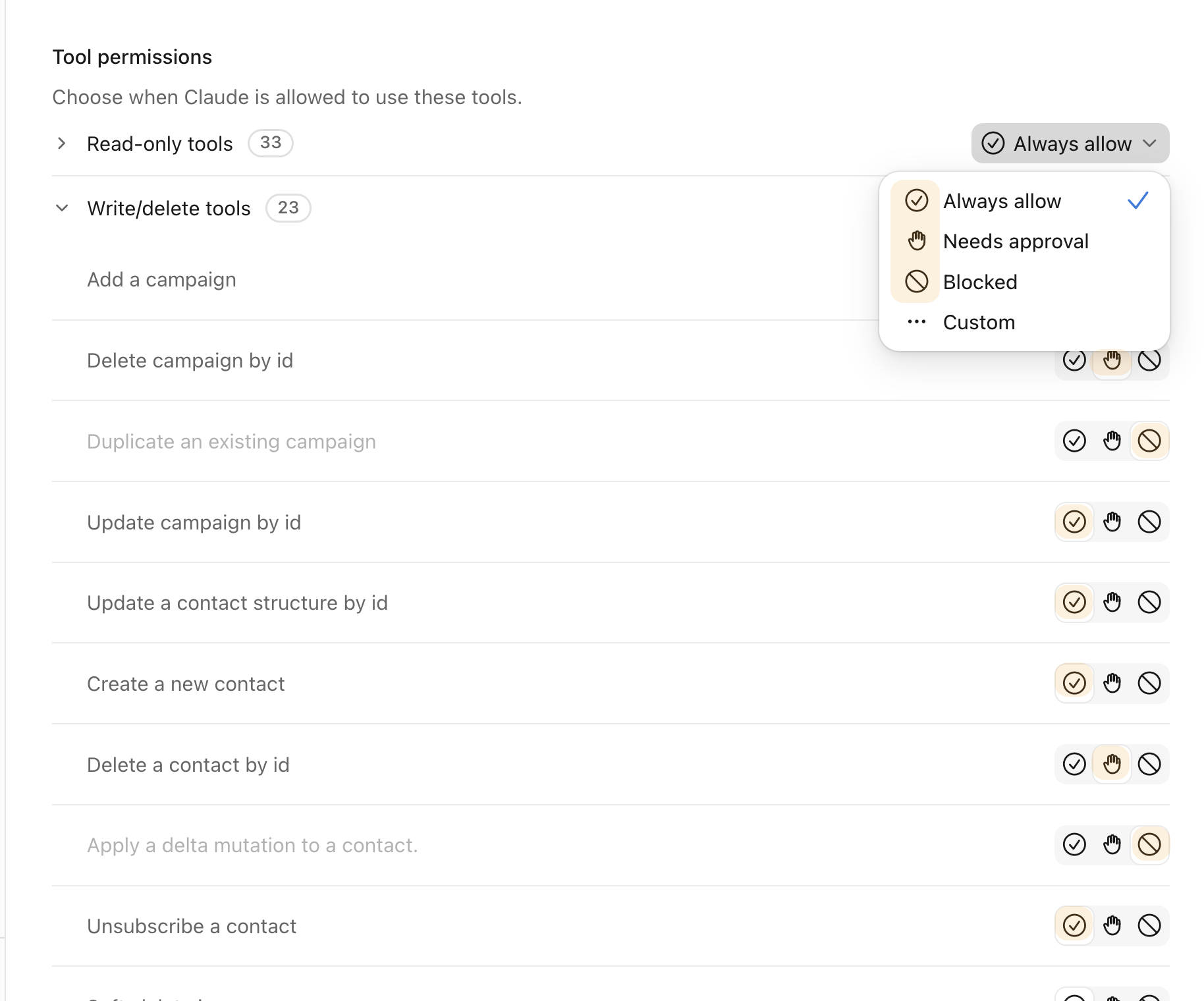
A well-designed connector separates read permissions (the assistant can see your contact lists) from write permissions (the assistant can create a campaign draft). You can choose what makes sense for how you want to use it.
If you ever want to adjust or revoke permissions, you can do that from within your Benchmark account. You don’t need to contact support.
Why the final send stays with you
Here’s the part of the design that matters most for safety: the AI assistant cannot send a campaign without your explicit approval inside Benchmark.
Draft it? Yes. Queue it for review? Yes. Set a proposed send time? Yes. Send it to your contact list without you seeing it first? No.
This is intentional. It means the worst case isn’t “the AI sent something wrong to everyone on my list.” The worst case is “the AI drafted something I don’t like,” and you don’t approve it.
That human approval step is the most important safety layer in the whole setup, and it’s why the combination of AI drafting and human review is more reliable than either one alone.
A checklist before you connect anything
Before you connect any email tool to any AI connector, Benchmark or otherwise, run through this list:
- Does the connector come from the platform itself or a verified third party? The Benchmark connector (currently in beta) is Benchmark’s own. Be cautious with third-party connectors that claim to connect tools you use. Check reviews and the developer’s identity before granting access.
- What permissions is the connector requesting? A connector that drafts and schedules email campaigns doesn’t need access to your billing, your admin settings, or other tools. If the permission request is broader than the stated use case, ask why.
- Does a human approve sends? Any connector that sends campaigns automatically, without human review, introduces unnecessary risk. Make sure you know where you fit in.
- Can you revoke access easily? You should be able to disconnect a connector from within your account settings without contacting support. If you can’t, note that before you grant access.
- Is your data staying in your account? Confirm that the connector isn’t routing your contact data through an unknown third-party server. With the Benchmark connector, your data stays in your Benchmark account.
If something looks off: real human support, 24/7
If you connect the Benchmark Email connector and something doesn’t look right, such as a campaign drafted with the wrong segment, unexpected account activity, or anything that makes you pause, real humans are available 24/7 on every paid plan.
You’re not reaching a knowledge base or a bot queue. You’re talking to a person who can look at your account and help you figure out what happened.
That support availability is part of what makes the overall setup trustworthy. The connector is designed to be safe. And if you ever have doubts, you have people to call.
Frequently Asked Questions
Can the AI read my emails?
The Benchmark Email connector gives Claude or ChatGPT access to your Benchmark account, your contact lists, and campaign drafts. It doesn’t access your personal inbox, Gmail, Outlook, or any emails outside of what’s in your Benchmark account.
What data can Claude access through connectors?
Through the Benchmark connector, Claude can see your contact lists, list segments, and campaign information inside Benchmark. It can’t access your billing details, passwords, or data from tools you haven’t connected.
Are MCP servers free?
The MCP protocol itself is open and free. The Benchmark connector is currently in beta and available at no additional cost during the beta period. Claude (Anthropic) and ChatGPT (OpenAI) have their own separate subscription models.
What happens if I want to disconnect?
You can revoke the connector’s access from within your Benchmark account settings. Once disconnected, the assistant no longer has access to your account data.
Can the AI accidentally send to the wrong list?
Because every campaign requires your approval before sending, a mis-segmented draft won’t go anywhere without your sign-off. You review the campaign, including the recipient list, before approving the send.
Is it safe to give the AI write access to my account?
Write access (the ability to create and edit campaign drafts) is different from send access. With Benchmark’s connector, write access lets the AI build campaigns for your review. You retain control of the actual send.
What if I’m on a free Benchmark plan?
The connector is currently in beta. Beta is open to all Benchmark plans via invite only. Every paid plan includes real human support via chat and email; phone support is available on the Enterprise plan.
If you’re a Benchmark Email user and would like to try out our connector, please reach out to our support team.

Sign up for a free Benchmark Email account today!
SIGN UP FREE
About the Author:

VP Product Marketing | Product, marketing, email | Allie Wolff is VP of Product Marketing at Benchmark Email, where she drives measurable product growth through compelling positioning, messaging, and go‑to‑market strategies. With over 18 years of expertise spanning B2B SaaS and email marketing, she’s spearheaded landmark initiatives—from the Canva integration to the rollout of Smart Content—bringing clarity and impact to busy marketers everywhere .