


Constant Contact vs Mailchimp vs Benchmark Email: The Best Choice for Your Email Marketing Use Case in 2025
I’ve been using Constant Contact and Mailchimp for over two weeks—creating email campaigns, managing contact lists, and optimizing engagement. Here’s how they stack up against each other:
Constant Contact is an all-in-one digital marketing platform built for growing businesses.
It provides tools for email marketing, SMS marketing, social ads, and customer engagement. When it comes to email marketing specifically, Constant Contact offers an intuitive drag-and-drop builder with over 200 templates for quick campaign creation. It also includes core features like contact management, segmentation, event management, forms, and landing pages. However, it lacks the depth of automation and omnichannel capabilities that Mailchimp offers.
On the other hand, Mailchimp is a marketing automation platform built for more complex use cases, especially for large teams with intricate strategies.
In addition to email and contact management, Mailchimp includes powerful reporting and analytics, store integrations, advanced Customer Journeys with multiple starting points, a full website builder with free hosting, and even a free branded domain.
Both platforms offer broad feature sets, but they can feel overwhelming if you’re only looking to send simple email campaigns, and they become expensive at higher sending volumes. That’s why we also included Benchmark Email in this comparison.
Benchmark Email is a dedicated email marketing platform focused on simplicity and essentials. It’s ideal for busy marketers and teams who want to get email marketing done quickly and effectively, without unnecessary complexity. Benchmark Email offers one of the most intuitive email builders, a modern set of templates, and an AI Assistant to help enhance and refine your content.
In this article, I compare Constant Contact vs Mailchimp vs Benchmark Email in the following categories:
- Pricing
- Email Builder
- Contact Management
- Analytics & Reports
- Advanced Features
Read on to see how each platform measures up in the key categories that matter most to email marketers.
Constant Contact vs Mailchimp vs Benchmark Email: Comparison Summary
| Constant Contact | Mailchimp | Benchmark Email |
|---|---|---|
 |
 |
 |
| Price | ||
|
14-day free trial on all plans. Paid plans start at $12/mo for 500 contacts. Lite plan costs $430/mo for up to 50,000 contacts and 500,000 emails sent. |
Offers a free plan with 1000 monthly emails for up to 500 contacts. Paid plans start at $13/mo for 500 contacts and 5,000 emails. Essentials plan costs $385/mo for 50,000 contacts and 500,000 emails. |
Free plan with 2,500 emails to 500 contacts. Paid plans start at $37/mo for 2,500 contacts and scale up to $499/mo for 100,000 contacts with 1,000,000 sends. Simple, transparent pricing with full feature access at all levels. |
| Email Builder | ||
|
Simple and intuitive email builder with 200+ templates, extensive content blocks, and AI tone adjustment. |
Advanced email builder with lots of customizations and email content block options + Embed services like Instagram, Yelp, and Playable. |
Intuitive email builder with essential content blocks, AI Assistant, image editor, and full customization. |
| Contact Management | ||
|
Advanced segmentation based on audience lists, tags, and complex rules. |
Advanced dashboards with tags and segments; full segmentation on higher plans. |
Simplified dashboards and easy list-based segmentation with powerful filtering and bulk actions. |
| Analytics & Reports | ||
|
Basic reports on email campaign performance and audience engagement. Shows trends based on past performance and average industry performance. |
Advanced reporting with customizable reports, revenue tracking, click maps, and Google Analytics integration. |
Simple yet comprehensive internal reporting, including campaign performance, contact engagement, and link activity insights. |
| Advanced Features | ||
|
Basic automation paths with email and SMS, conditional splits, and branching logic. Offers sign-up forms, Facebook and Instagram Lead Ads, and a drag-and-drop landing page builder. |
Advanced Customer Journeys with multiple triggers, branching paths, 100+ templates, and AI content generation. Forms, landing pages, surveys, and full website builder. |
🎯 Focuses on essential email marketing features only; no advanced automation or lead gen tools. Delivers just what most email marketers need without extra complexity. |
| Used By | ||
|
Infosys, Cornell University, Panasonic Corp, Fujitsu Ltd. |
Arkade, AnnexCore, DailyMode Studio, Glovo, Ontraport |
Toyota, Audi, Courtyard Marriott, Canterbury Gardens, Office Depot |
| Best For | ||
|
Seasoned DIY marketers who want to manage all marketing from one platform |
Large marketing teams with heavy automation needs and intricate omnichannel strategies |
Busy marketers who want a simple and effective email marketing tool without unnecessary extras |
|
14-day free trial (credit card required) |
Try free forever (no card required) |
Try free forever (no card required) |


What is Constant Contact?
"Complete Digital Marketing Toolkit" 
Originally called Roving Software, Constant Contact was created in 1995 by Randy Parker to level the playing field between small businesses and their larger competitors. Since then, it has helped make digital marketing more accessible and affordable to small businesses.
Constant Contact offers email marketing, SMS marketing, automation, social media ads, sign-up forms, surveys, and landing pages. When it comes to email marketing, its intuitive drag-and-drop email builder, over 200 customizable templates, and reporting tools help users create and manage engaging campaigns. Constant Contact also includes contact management, segmentation, and integrations with platforms like Facebook and Instagram to drive audience engagement and business growth.
Constant Contact is best for DIY marketers wearing many hats, nonprofits, and organizations that need an all-in-one digital marketing platform.
What is Mailchimp?
"All-in-one marketing powerhouse" 

Mailchimp was founded in 2001 by Ben Chesnut and Dan Kurzius as an alternative to the bloated, expensive email software of that era. It offered small businesses access to the same digital marketing tools their larger competitors enjoyed.
Mailchimp offers customizable templates and a drag-and-drop editor to create targeted email campaigns. It supports audience segmentation with lists, tags, and rules, plus automation workflows. Users can also design landing pages, forms, and full websites without coding. Detailed reports and analytics track performance and engagement. Mailchimp integrates with platforms like Shopify, WooCommerce, and Magento to sync customer data, track purchases, and send product recommendations and promotional emails.
Mailchimp is best for large marketing teams with heavy marketing automation needs and intricate omnichannel strategies.
What is Benchmark Email?
"All You Need to Send Great Emails, Nothing You Don’t" 

Benchmark Email was created by Curt and Denise Keller in 2004 to help marketers simplify their marketing journey. It is a powerful, yet extremely easy-to-use email marketing platform.
Benchmark Email provides an intuitive drag-and-drop editor and customizable templates to design eye-catching emails without coding knowledge. It offers ease-of-use, modern templates, and an AI assistant for generating images and enhancing text. It also provides simple and intuitive contact segmentation based on contact information, activity, tags, list membership, and email events to send personalized content. Detailed analytics track performance metrics like open rates and click-through rates to help optimize campaigns.
Benchmark Email is ideal for small to mid-sized B2C businesses and marketing generalists who want a simple but powerful platform without unnecessary extras.
Constant Contact vs Mailchimp vs Benchmark Email: Pricing
| Constant Contact | Mailchimp | Benchmark Email |
|---|---|---|
|
|
|
|
|
Tiered pricing model with three plans that scale by contact count and user seats. |
Free plan plus subscriptions with scalable features, generous team seats, and a pay-as-you-go option. |
Free plan and straightforward contact-based pricing with full feature access at all levels and no locked tiers. |
Constant Contact offers three pricing plans based on the number of contacts.
You can try Constant Contact for 14 days, after which you’ll have to opt for a paid subscription. You can choose between three pricing plans: Lite, Standard, and Premium.
The Lite plan starts at $12/month for 500 contacts and caps out at $430/month for 50,000 contacts and 10x that monthly email sends (so 500,000), but is available only for 1 user. It offers basic email & SMS marketing, event forms, social media marketing, and a single automation template.
The Standard plan starts at $35/month for 500 contacts and allows up to 12x of monthly email sends. It includes access for 3 users and provides all marketing and audience engagement tools, including email scheduling and A/B testing. However, it does not support custom automation paths or advanced Ads features, which are available in the Premium plan only.
| Contacts | Lite (10x monthly sends, 1 user) |
Standard (12x monthly sends, 3 users) |
Premium (24x monthly sends,unlimited users) |
|---|---|---|---|
| 500 contacts | $12/month | $35/month | $80/month |
| 2,500 contacts | $50/month | $75/month | $150/month |
| 5,000 contacts | $80/month | $110/month | $200/month |
| 20,000 contacts | $230/month | $260/month | $375/month |
| 40,000 contacts | $370/month | $400/month | $515/month |
| 50,000 contacts | $430/month | $460/month | $575/month |
Constant Contact lets you choose from all three pricing tiers, regardless of your contact count, though plans currently appear to top out at 50,000 contacts.
Mailchimp is less expensive and unlocks more features on lower plans than Constant Contact.
Mailchimp’s Free plan allows you to send up to 1,000 emails per month to 500 contacts. It includes all core email marketing tools, though with limited analytics, limited pre-built email templates, and no email scheduling. All plans allow you to create a website with free hosting and a Mailchimp-branded domain at no additional cost.
The paid plans start with the Essentials plan at $13/month, which includes 5,000 monthly email sends to 500 contacts. The Standard and Premium plans increase contact and send limits and add advanced features like generative AI, custom reports, and social post scheduling. As with Constant Contact, the total cost of each plan depends on the number of contacts. However, your plan options become more limited as your email list grows. For example, you can’t choose the Essentials plan if you have more than 50,000 contacts.
| Contacts | Essential (10x monthly sends, 3 users) |
Standard (12x monthly sends, 5 users) |
Premium (300x monthly sends, unlimited users) |
|---|---|---|---|
| 500 contacts | $13/month | $20/month | $350/month |
| 2,500 contacts | $45/month | $60/month | $350/month |
| 5,000 contacts | $75/month | $100/month | $350/month |
| 20,000 contacts | $230/month | $285/month | $535/month |
| 40,000 contacts | $340/month | $410/month | $750/month |
| 50,000 contacts | $385/month | $450/month | $815/month |
| 75,000 contacts | Not available | $630/month | $900/month |
In addition, Mailchimp offers more team seats than Constant Contact for each equivalent plan. And it offers a Pay As You Go option, which Constant Contact doesn’t.
Then there’s also a separate pricing for transactional emails only. The price starts at $20/block for up to 20 blocks. Each block is a credit for 25,000 emails, and its cost reduces as the number of purchased blocks increases. You can also opt for a dedicated sender IP address at $29.95/month to improve deliverability and pass spam detection tests.
| Contacts | Emails sends per month | Benchmark Email Pro (unlimited sub-accounts) |
|---|---|---|
| 2,500 | 25,000 | $37/month |
| 5,000 | 50,000 | $63/month |
| 10,000 | 100,000 | $93/month |
| 15,000 | 150,000 | $129/month |
| 20,000 | 200,000 | $149/month |
| 25,000 | 250,000 | $179/month |
| 30,000 | 300,000 | $209/month |
| 40,000 | 400,000 | $269/month |
| 50,000 | 500,000 | $299/month |
| 75,000 | 750,000 | $399/month |
| 100,000 | 1,000,000 | $499/month |
Each plan includes one user by default, with additional users available for $15 per month each.
Billing is monthly by default, with annual billing available at a discount (initially set at 20%, subject to change). All limits—including contacts, sends, and domains—reset on a monthly basis, regardless of billing frequency. The Free plan includes one authenticated domain, while the Send It plan allows up to ten.
Benchmark Email delivers the same contact limits at a much lower cost compared to competitors, and without locking essential features behind expensive tiers. While competitors may offer a broader range of features, these are restricted or unavailable at lower pricing levels. With Benchmark Email, you gain full functionality at a fraction of the price.
Winner: Benchmark Email wins this round with its simple, transparent pricing and full feature access at every tier. Mailchimp offers more flexibility and extras at lower plan levels, while Constant Contact remains the most expensive and restrictive of the three.
Constant Contact vs Mailchimp vs Benchmark Email: Email Builder
| Constant Contact | Mailchimp | Benchmark Email |
|---|---|---|
|
|
|
|
|
Simple, beginner-friendly email builder with hundreds of templates. |
Advanced email builder with extensive customization and content options. |
Intuitive builder with essential features and unmatched customization options. |
Constant Contact offers a simple email builder with hundreds of templates.
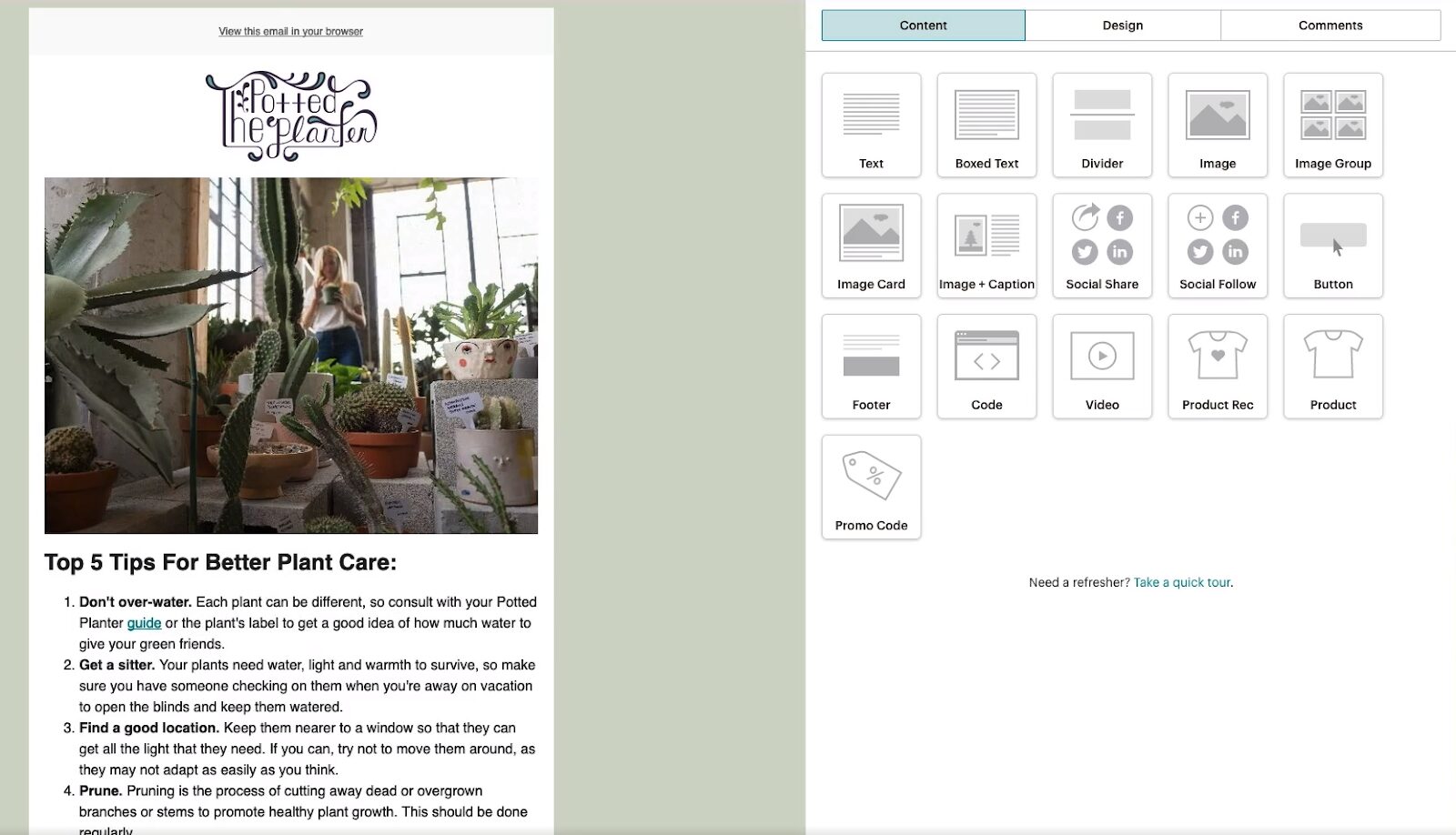
Constant Contact offers a simple and intuitive email builder with a drag-and-drop interface that’s very approachable for beginners. You can start from blank, convert from PDF, or build with HTML, but primarily, you work with templates. There are over 200 templates you can choose from to help you get started quickly. You won’t find many detailed styling options in the editor compared to competitors; however, this may actually be a benefit if you prefer a simpler, less overwhelming experience.

In addition to standard blocks for text, images, and videos, Constant Contact also offers advanced options like feedback and RSVP blocks to collect audience information, as well as a product block that connects directly to your online store for showcasing products. And when it comes to personalization, you can add dynamic text and images that change automatically for each individual recipient.

To ensure your email design looks great on all devices, you can preview emails in both desktop and mobile views, test them using a specific contact’s email address, and send test emails. Additionally, for your convenience, Constant Contact provides a Cross Device Email Editor, allowing you to edit emails directly in a mobile app. However, unlike the competitors, it doesn’t offer separate settings for customizing the mobile version of the emails you’re creating.
Mailchimp’s email builder offers advanced content block options.
Mailchimp offers two types of email builders.
The Classic Builder, which offers all the standard content blocks, is no longer the default builder but is available for emails created before the New Builder was introduced. You can also set it as the default builder in your account settings. This one, however, couldn’t compete with Constant Contact’s builder.
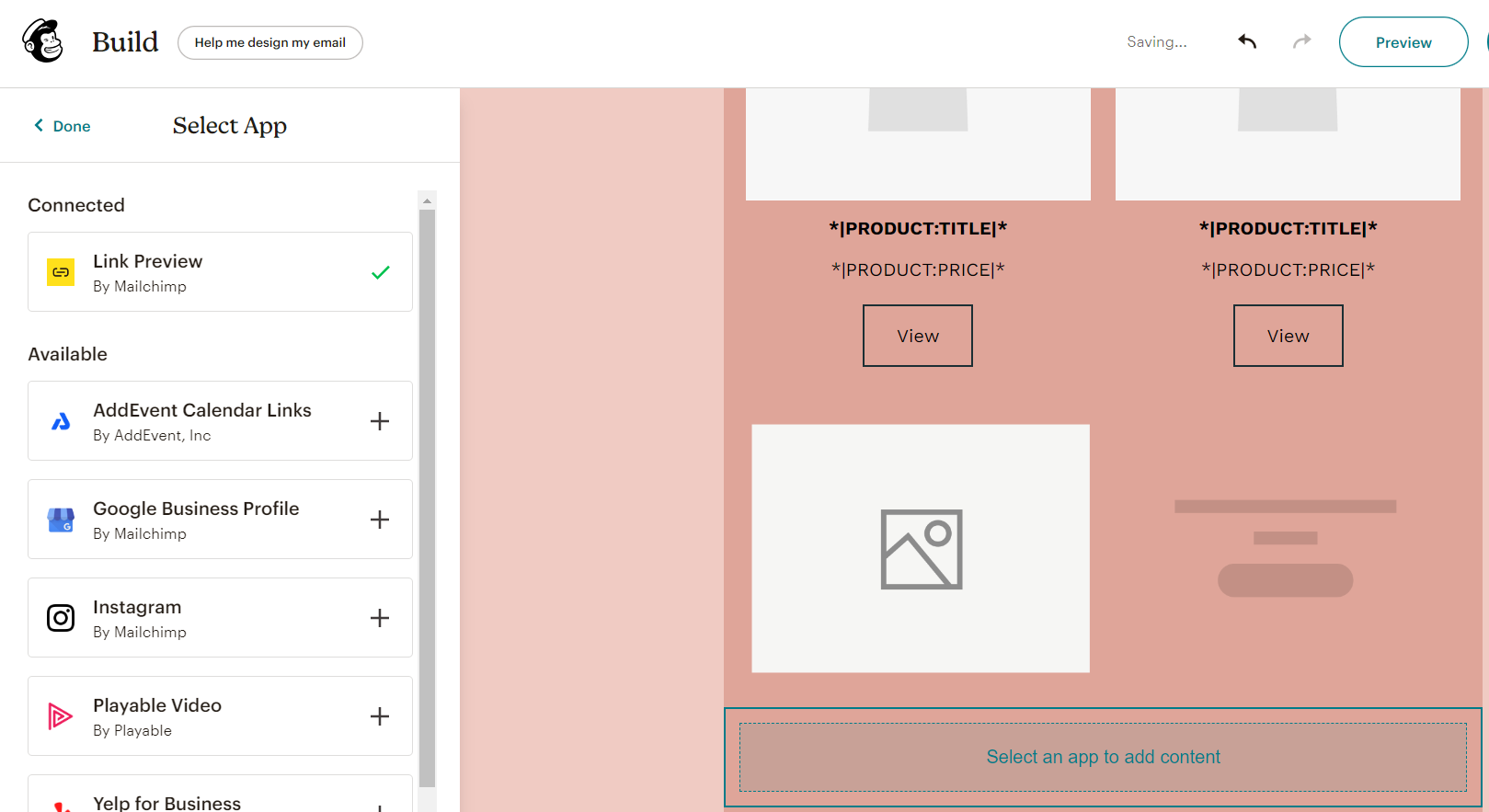
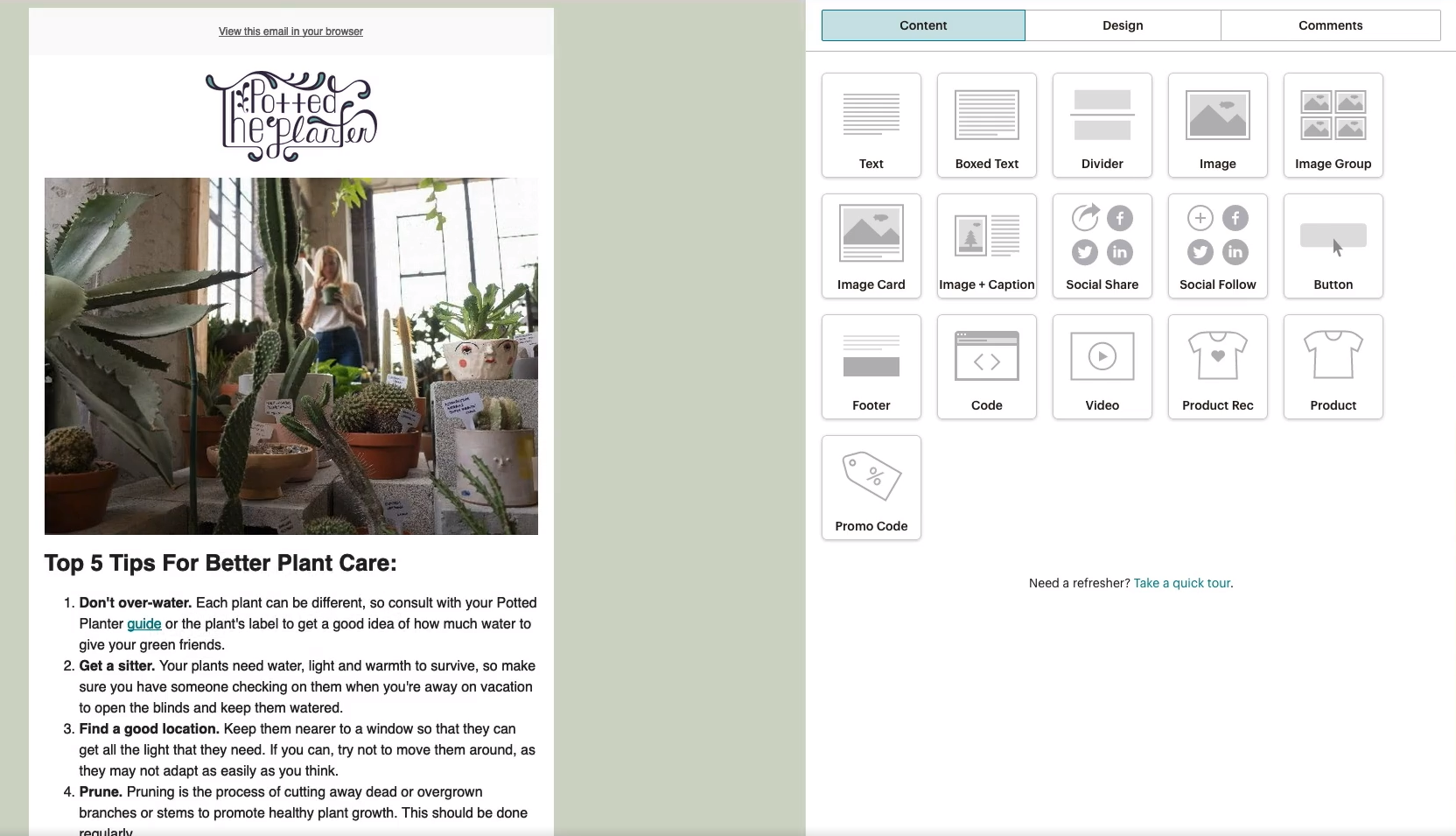
The New Builder, on the other hand, is more powerful than Constant Contact’s, offering more customization and content options. You can edit images directly within the editor and access more granular controls for paddings, borders, and corner settings across blocks. It includes all the content blocks of the Classic Builder, plus advanced additions like Creative Assistant, Survey, and Apps blocks. Plus, there’s a dynamic content option to show different content to different audiences.

The unique Apps block lets you connect third-party apps and services to your email. For example, you can link to an Instagram account or even preview content from any web page directly in your email.
You can also add product recommendations or even sell products directly from any email, just as you can with Constant Contact.
Mailchimp offers plenty of templates—over 130—but these are available only on paid plans. With the free plan, you’re limited to basic layouts. When creating an email using the New Builder, you can choose from one of five template types:
- Fully designed templates — use a pre-built template or use the Creative Assistant to work with your brand assets,
- Basic layouts — use templates that allow you to easily manipulate content and quickly shape your message,
- Saved templates — use an email design that you previously saved as a template,
- Draft emails — use a design you’ve started work on, but haven’t sent,
- Code your own — use the import feature or paste in your custom coded design
- Recently sent emails — use one of your recently sent emails as inspiration for a new design.
Unlike Constant Contact, Mailchimp lets you style your email differently for desktop and mobile devices. However, it lacks the precise screen preview capabilities of Benchmark Email, offering only general desktop, mobile, and inbox previews without exact dimensions. You also can’t hide entire elements from mobile or desktop views as you can with Benchmark Email.
Benchmark Email offers essential but powerful features with unmatched customization options.
Compared to the other two, Benchmark Email’s email builder offers the most intuitive user experience.
That’s because Benchmark Email uses a proprietary editor designed around user feedback and recommendations. It eliminates unnecessary complexity, providing exactly what you need to create effective emails—nothing more, nothing less.
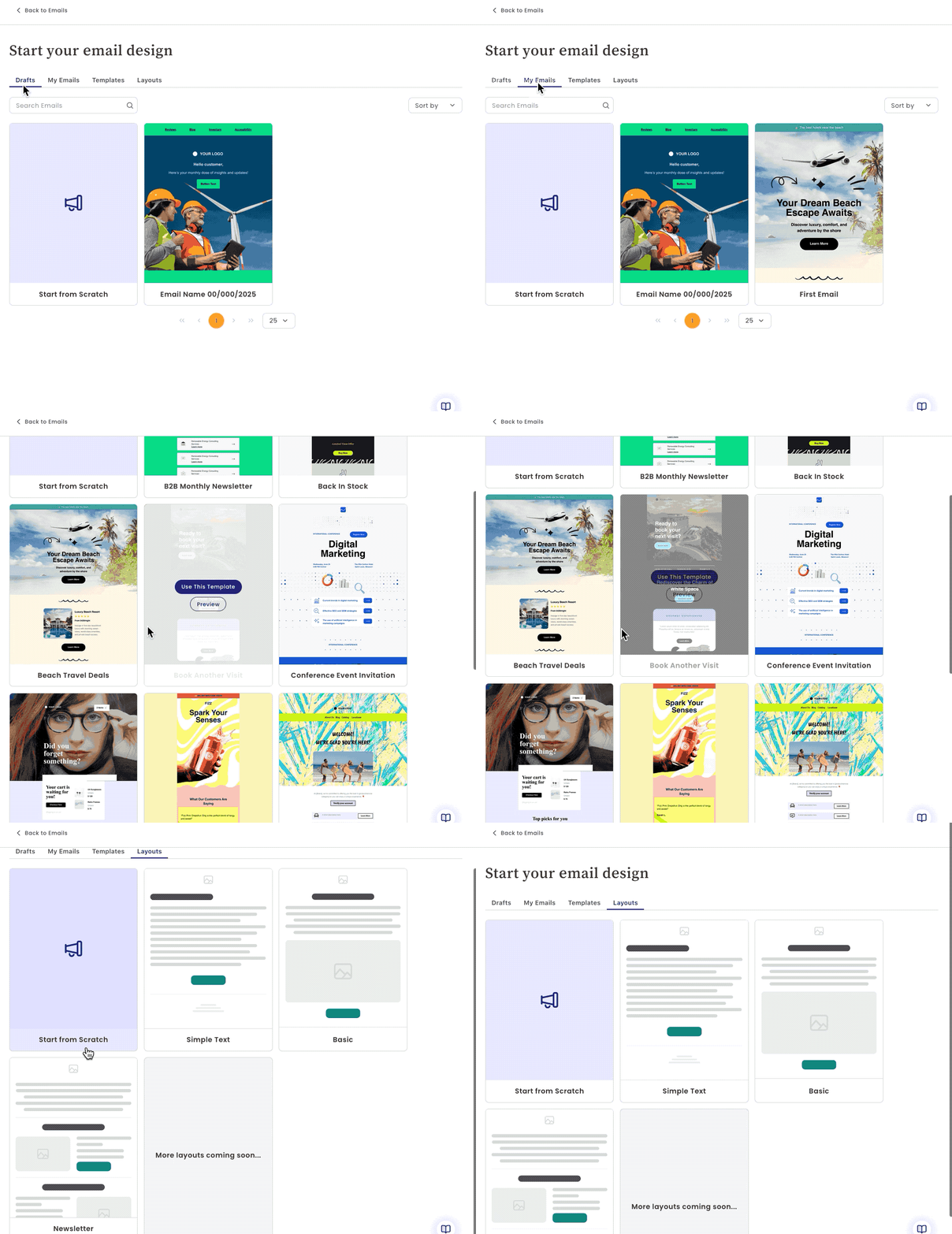
There are several ways to create emails in Benchmark Email:
- Templates — create emails using one of the customizable pre-built templates,
- Drafts — continue creating from where you left off,
- My Emails — repurpose previous emails in your new campaign,
- Layouts — start with a simple structure outline,
Start from scratch — create a new email from scratch using the drag-and-drop builder.
The core of Benchmark Email’s builder, like its competitors, is content blocks. Benchmark Email offers 11 essential blocks—everything you’ll actually use and nothing you won’t: columns, text, heading, image, button, divider, menu, HTML, video, social, and timer. Each block is fully editable with granular settings to match your design needs.
Benchmark Email allows you to use building blocks (not to be confused with content blocks) to organize the layout of your email. All sections, except for the footer, can be easily rearranged using intuitive drag-and-drop arrows. You can also customize individual sections or apply global settings such as text color, fonts, background color, and link styles.
Benchmark Email uses sections to organize your email content — all sections except the Header and Footer can be reorganized using intuitive Up/Down arrows. It lets you apply a global style to all sections or you can customize each section individually.
When styling your email, you can choose from 27 designed curated color schemes, or set a custom background color. As an alternative, Benchmark Email lets you set up a ‘Brand Kit’ to add logos and color schemes from your own website to the email builder in just a few clicks.

While Benchmark Email doesn’t offer direct product integration like some competitors, its image content block is well thought out for the same purpose. You can display products without any needed integrations and even create product carousels by adding multiple images in an image box.
When it comes to more advanced tools, Benchmark Email provides simple personalization using dynamic tags within text. It also includes a built-in image editor to enhance visuals with effects, stickers, text, and more.

The builder further offers AI assistance for enhancing content within text, heading, image, and button blocks. While the text assistant won’t fully write your content, it can help improve and refine it significantly. The image assistant, on the other hand, will generate complete images for you. In comparison, Mailchimp’s AI is still in beta and currently supports only image generation, while Constant Contact offers only basic tone adjustments with its AI.

To help you perfect your design across devices, Benchmark Email includes desktop, tablet, and mobile previews, along with exact screen width previews, dark mode vs. light mode views, and the option to send test emails to different inboxes. You can even hide elements on desktop or mobile, ensuring your design looks perfect everywhere. Benchmark Email also allows you to edit mobile and desktop versions separately, giving you complete control—something Constant Contact doesn’t offer, and Mailchimp only partially supports.

Finally, Benchmark Email includes the Email Audit feature, which scans your email and notifies you about missing key elements to ensure your campaign is optimized for successful delivery.

Winner: Benchmark Email takes the lead in this category. Its email builder is simple and intuitive, offering all the essentials you need to create any email imaginable, without overwhelming you with unnecessary features. It provides flexible customization options, an image editor, and an AI assistant to enhance your content and visuals. Benchmark Email also stands out with advanced preview modes and the ability to edit mobile and desktop versions separately. If you want the most capable and user-friendly email builder, Benchmark Email is the platform for you.
Constant Contact vs Mailchimp vs Benchmark Email: Contact Management
| Constant Contact | Mailchimp | Benchmark Email |
|---|---|---|
|
|
|
|
|
Separate dashboards with lists, tags, and powerful segmentation tools. |
Advanced dashboards with tags and segments; full segmentation on higher plans. |
Simplified dashboards with list-based segmentation and easy bulk actions. |
Constant Contact separates contacts into lists, tags, and segments, offering all the essentials for segmentation.
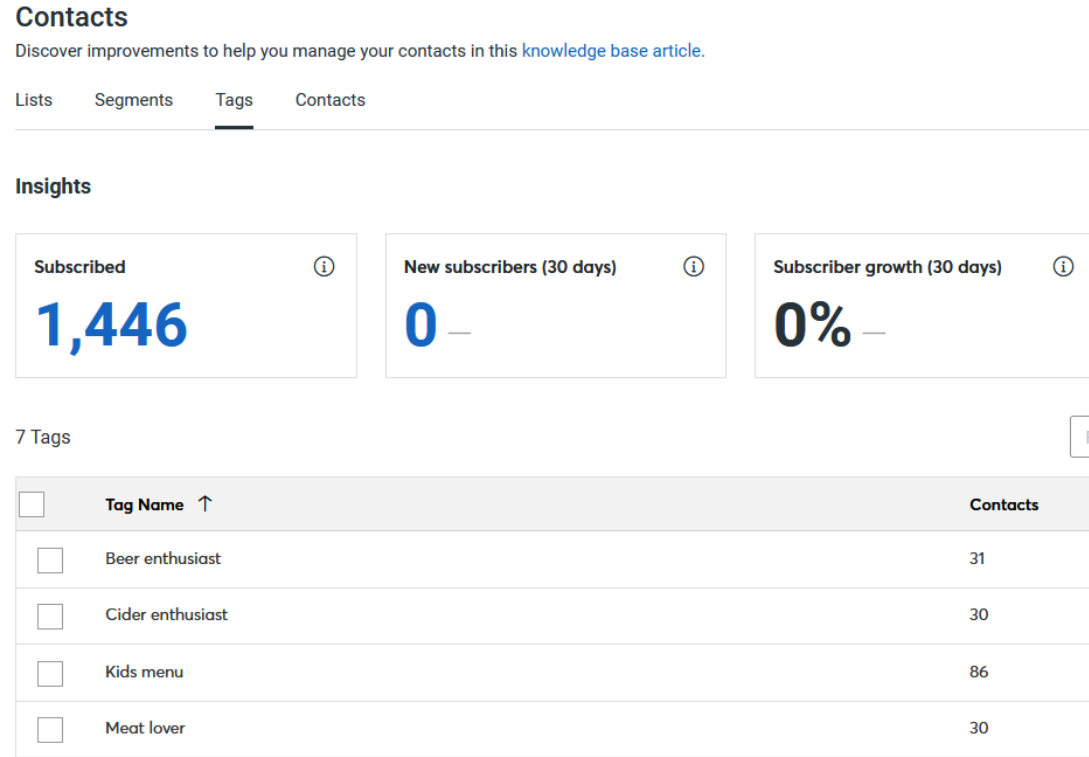
Constant Contact’s contact management system separates contacts, lists, segments, and tags into dedicated dashboards.
In the Contacts dashboard, you can view all your contacts, filter them by subscription status, and search them easily. You can also add contacts individually or in bulk, and export contact data. The Tags dashboard allows you to create and manage up to 500 custom tags, which help define relationships between otherwise unrelated contacts. Tags can also be applied in filters and segmentation rules. In the Lists dashboard, you can organize contacts into specific lists, add or remove contacts, and apply tags.
Each dashboard also provides its own insights and analytics to help you monitor audience engagement.
The Segments feature allows you to group contacts into custom audiences. You can apply both AND and OR logic to combine multiple conditions, filtering contacts based on:
- tags,
- contact details,
- contact activity,
- list membership,
- and eCommerce activity.

These segments can then be used across email marketing campaigns, automations, and customer journeys to ensure the right content reaches the right audience.
Mailchimp organizes contacts with tags and segments but limits advanced segmentation to higher plans.
Mailchimp organizes your contact list under the Audience tab.
The Audience dashboard provides an overview of insights, while separate dashboards for Tags, Segments, Surveys, Subscriber Preferences, and Inbox allow for detailed contact management. These dashboards work similarly to Constant Contact, with the exception of the unique Inbox dashboard, which collects all 1-on-1 conversations with your audience.
When it comes to segmentation, Mailchimp lets you segment your contacts using straightforward logic by selecting from criteria such as tags, contact details, activity, and acquisition source. You can chain up to five conditions; however, you cannot mix AND and OR logic within the same segment—you must choose one or the other. Mailchimp also provides pre-built segments for added convenience.

Mailchimp’s segmentation, like Constant Contact’s, also works with eCommerce activity. By connecting your online store, you can filter contacts based on purchase behavior, store, product, amount spent, and other eCommerce data.
But that’s just the starting point.
The Advanced Segmentation feature offers complex and highly flexible audience filtering. It allows you to chain unlimited conditions using both AND and OR logic, and even nest conditions within each other. This enables you to create dynamic segments that group contacts meeting significantly different conditions into the same audience. The Advanced Segmentation feature is only available in the Standard and Premium plans, however.

Benchmark Email avoids complexity with simple dashboards and list-based segmentation.
Benchmark Email has a slightly different approach to contact management, and it’s the most straightforward of the three.
There’s a main Contacts dashboard that displays all contacts, with additional Lists and Tags dashboards for organizing segmented contacts.
In the Contacts dashboard, you can perform bulk actions such as send email, add contacts to a static list, remove contacts, add or remove tags, and delete contacts. You can also filter contacts using a wide range of criteria and create new custom lists directly from those filters.
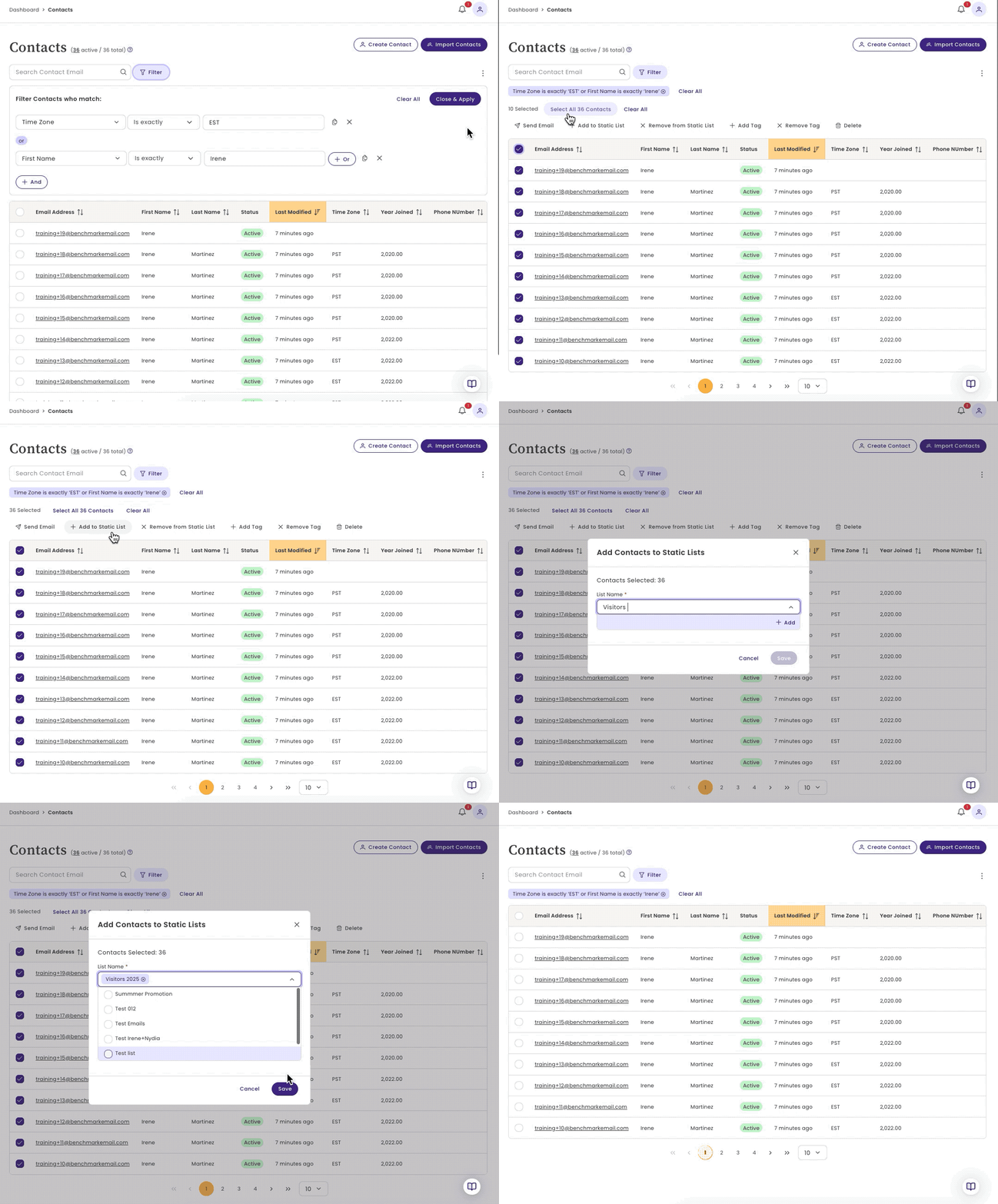
Each contact also has a profile view, where you can see detailed activity for that individual.

You can use Lists much like segments in competing platforms. Lists can be created based on contact information, activity, tags, list membership, and email events. Similar to competitors, Benchmark Email allows you to apply multiple conditions within a single list, using both AND and OR logic to build highly targeted audience groups.

Winner: Benchmark Email offers the most streamlined and intuitive contact management experience, with a simple dashboard structure, flexible list-based segmentation, and powerful bulk actions. While Constant Contact and Mailchimp provide strong traditional systems, Benchmark Email delivers the same essential tools without unnecessary complexity or feature restrictions.
Constant Contact vs Mailchimp vs Benchmark Email: Analytics & Reports
| Constant Contact | Mailchimp | Benchmark Email |
|---|---|---|
|
|
|
|
|
Offers simple reports on email campaigns and audience engagement. |
Offers advanced reports on campaigns, revenue, and Google Analytics. |
Simple yet comprehensive reporting with performance, contact, and engagement insights. |
Constant Contact has an interactive dashboard for email campaigns.
Constant Contact’s reporting dashboard generates valuable metrics on your emails, contacts, and eCommerce performance.
The Emails dashboard provides an overview of all emails sent within a selected date range, with detailed metrics on sends, deliveries, opens, clicks, bounces, unsubscribes, and conversions. You can also compare results to a previous period, year, or custom date range.

The Trends section shows your average open and click rates for the selected time frame, as well as comparisons to your industry averages (if set in account settings).

Constant Contact also includes a table view of all sent email campaigns. You can search for a specific campaign by name and sort all campaigns by send date or click rate. You can select up to five campaigns and compare their metrics on a graph—clicking a metric label allows you to hide it from the graph.
Selecting a specific campaign opens in-depth metrics about audience engagement, including:
- Sent — total contacts the email was sent to
- Delivered — successfully delivered emails
- Opened — contacts who opened the email
- Clicks — contacts who clicked links in the email
- Bounced — emails that bounced back
- Unsubscribed — contacts who opted out of future emails
- Conversions & Sales — (if eCommerce is connected) percentage of emails resulting in purchases and total revenue generated
The reporting also breaks down performance by device, showing the percentage of opens and clicks from mobile vs. desktop. Additionally, you can view your top and lowest performing campaigns and links based on open rate, click rate, or total clicks.
Mailchimp offers advanced analytics and many custom report types.
Mailchimp offers multiple ways to access campaign insights, starting with the Analytics dashboard and extending to fully customizable reports. The dashboard gives you a general overview and lets you filter by audience, message type (email or SMS), date range, and even exclude Apple Mail Privacy Protection (MPP) opens for more accurate data.
Mailchimp’s reporting tracks more metrics than Constant Contact, covering standard stats like opens, clicks, and bounces, as well as additional insights including:
- forwarded emails
- forwarded opens
- abuse reports
- last opened
- social performance
- top geographic locations

Unlike Constant Contact, Mailchimp offers a dedicated tool for creating reports. One of these is a Click Summary report that displays individual link performance and provides a click map to visually highlight where contacts clicked within your email.
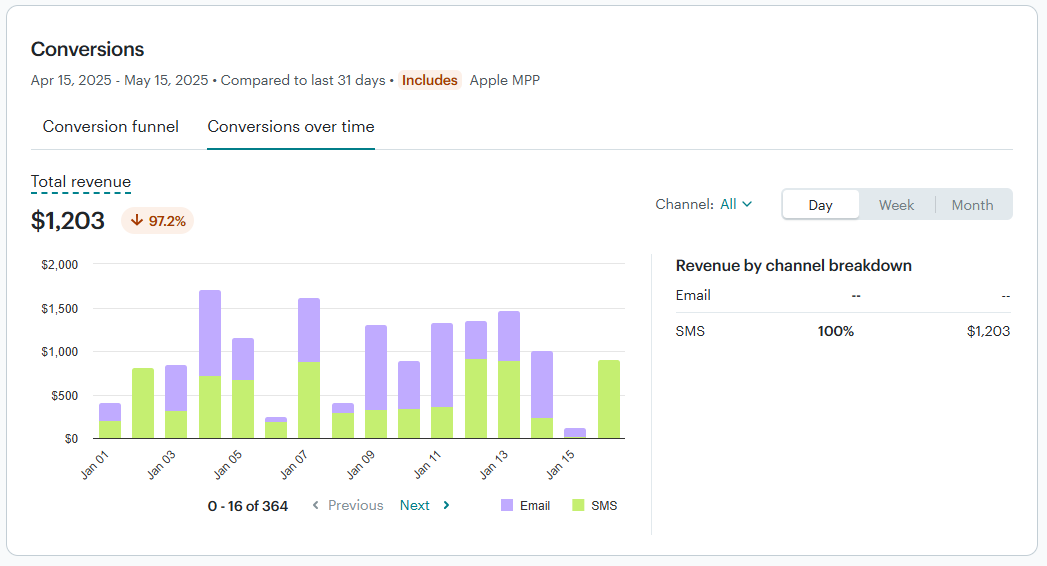
If you connect your online store to Mailchimp, you unlock detailed revenue tracking: view individual product sales, total campaign revenue, orders, and conversion funnels.
You can also integrate Google Analytics with Mailchimp to pass website visitor data back into your reports. This allows you to track visits to campaign pages, landing pages, and websites, and to add tracking to A/B test campaigns.
Constant Contact vs Mailchimp: Advanced Features
Constant Contact’s reporting dashboard generates valuable metrics on your emails, contacts, and eCommerce performance.
Constant Contact vs Mailchimp: Advanced Features
| Constant Contact | Mailchimp |
|---|---|
|
|
|
|
Simple email and SMS automation with basic A/B testing and straightforward form and landing page builders. |
Advanced Customer Journeys, full website builder, powerful A/B testing, and highly customizable forms and landing pages. |
Note: Benchmark Email was not included in this feature comparison section because it intentionally focuses on core essentials, catering to email marketing generalists rather than advanced power users.
Marketing Automation: Constant Contact focuses on simple email and SMS automation, while Mailchimp offers advanced, customizable Customer Journeys.
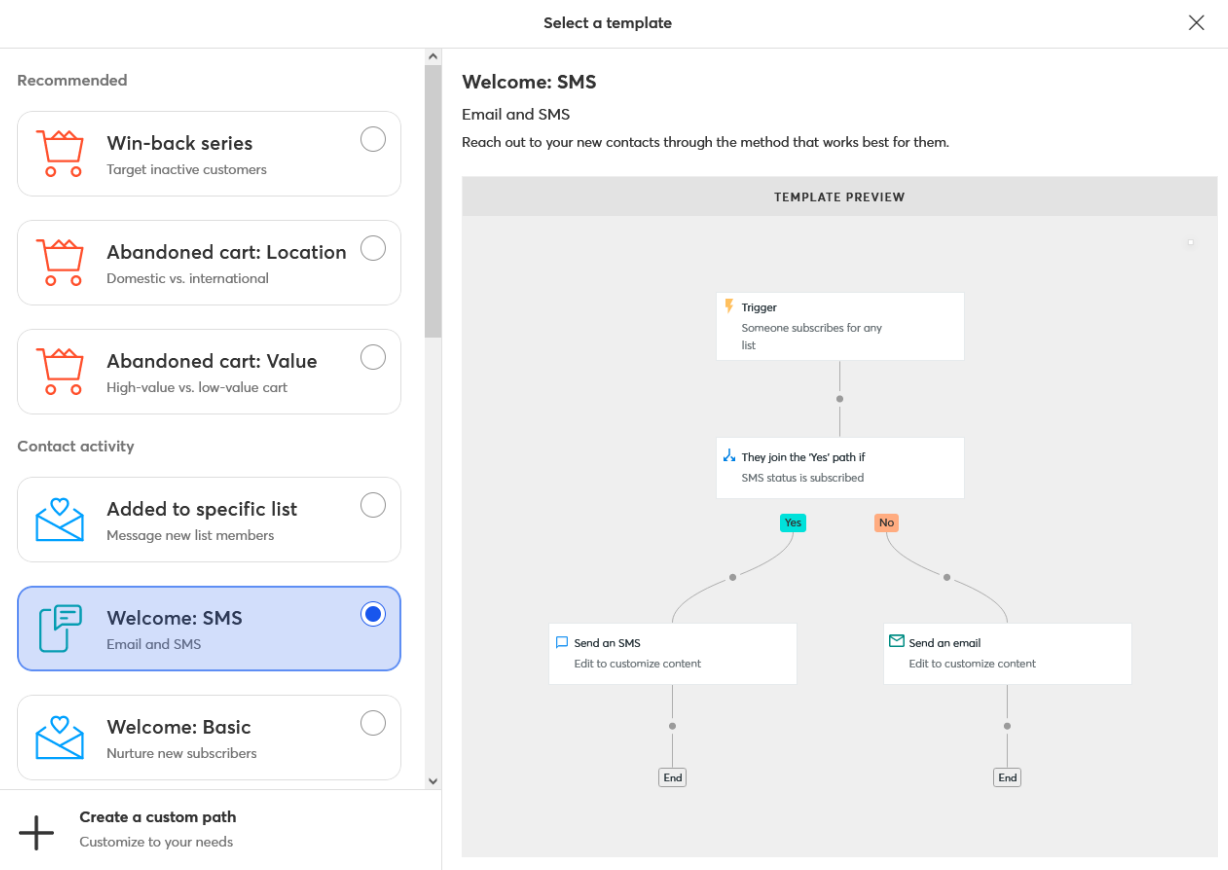
Constant Contact’s Automation Path Builder combines SMS and email automation, so you can reach the right audience at the right time.
It offers customizable automation templates that you can use as-is or further customize to suit your specific needs. Alternatively, you can build an automation from scratch, starting with a trigger that launches the automation.

Each automation path consists of a single trigger, one or more conditionals, and one or more executed actions. The time delay conditional waits until the set duration elapses before executing the action, while the conditional split branches into Yes/No paths depending on the criteria set for each contact.
When choosing an email to send using the automation path, Constant Contact lets you copy an existing email or create a new one from scratch. However, you must always create an SMS from scratch.
While Constant Contact offers a streamlined automation experience, Mailchimp takes automation to a more advanced level with its Customer Journeys.
Mailchimp offers Classic Automations that send a series of targeted emails triggered by specific dates, events, or contact activity. While this feature is still available to users who have created classic automations, it has long been discontinued in favor of the more powerful Customer Journeys.
On the surface, Customer Journeys look similar to Constant Contact’s automation paths, but they are much more powerful and customizable.
First off, each journey can have multiple starting points. You can also configure each starting point with filters that determine which contacts are eligible for the journey.

Each Customer Journey consists of one or more journey points, such as:
- If/Else — splits contacts down a branch based on 5 conditions you choose
- Percentage split — divides contacts into two journey paths based on the set percentage
- Wait for trigger — pauses the journey for the contact until it meets the specified condition
- Send email — sends an email to the contact
- Tag/Untag — adds or removes a tag on the contact

Lead Generation: Both Constant Contact and Mailchimp offer form and landing page builders, but Mailchimp also includes a full website builder.
Constant Contact offers five types of sign-up forms that you can embed in your website:
- inline,
- pop-up,
- banner,
- flyout,
- and WordPress form plugin.
It also offers Facebook and Instagram Lead Ads, allowing you to create forms that target audiences based on their interests, age, location, and more. With this, you simply set a budget and Facebook does the work to get it to the right audience.

Constant Contact forms are fully customizable. You can set the form title and description, and add as many custom fields as you want. In addition, it lets you display the form on a timer or when the visitor moves to exit the tab.

To improve accessibility, you can choose whether to display the form on desktop or mobile devices only or on both.
Forms require you to modify the HTML code for your webpage, but some users are unable to do so. That's why Constant Contact offers sign-up landing pages with URLs you can embed in buttons and hyperlinks.
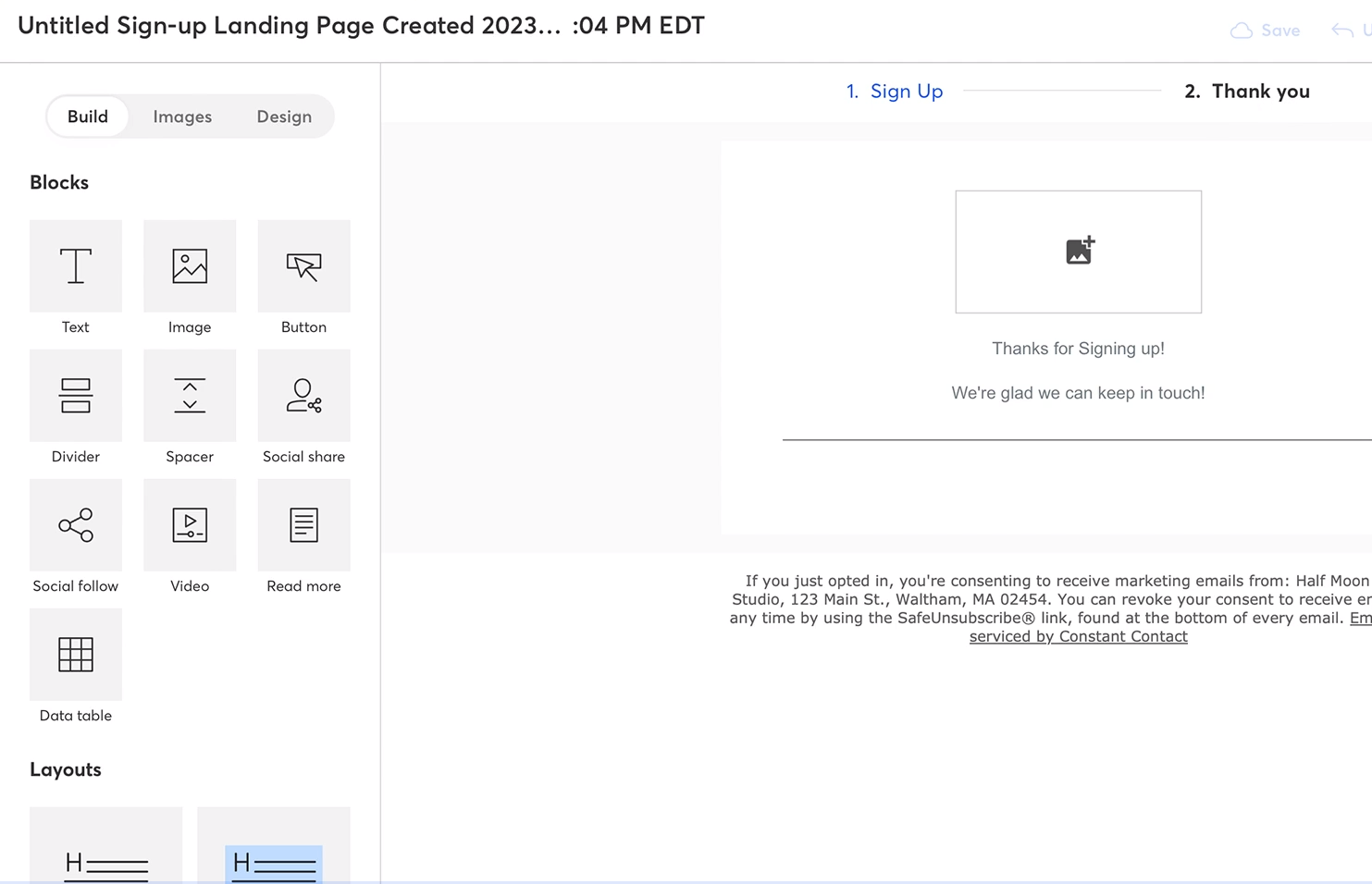
It offers free hosting for your standalone landing pages and provides a drag-and-drop editor for designing them. Unlike regular sign-up forms, landing pages support images, videos, tables, and other web page content.
Mailchimp's form builder offers many more customization options than Constant Contact’s. It also includes more form types and web pages, such as:
- signup form,
- confirmation page,
- unsubscribe form,
- goodbye email,
- update profile form,
- and forward to a friend form.
You can add custom fields and customize the background color, header image, dimensions, and other style properties. Forms also feature auto-translation, allowing you to set a default language, form text, and even text direction.
Mailchimp also lets you create standalone landing pages that present promotional offers, surveys, sign-up forms, or any other information you choose for your audience.
The landing page builder has similar controls, content blocks, and customizations to its email designer. And, it offers pre-built templates that serve as a starting point for your designs.

Mailchimp allows you to customize the landing page's URL and content preview when you embed the URL in social media. You can also set the audience associated with the landing page and filter them based on custom tags.
In addition to standalone landing pages, Mailchimp allows you to build a full website with a drag-and-drop builder. There's no limit to the number of pages on your website, and you can customize how each page animates when a visitor scrolls through it.

Constant Contact vs Mailchimp: Advanced Features
A/B Testing: Both platforms offer A/B testing, but Mailchimp supports more variables, multiple variations, and customizable winning criteria.
Constant Contact offers basic testing on emails to help improve your open rates.
It provides a recommendation engine that generates two subject lines based on your email content, industry, and expert opinion. Then, it tests the subject lines on a portion of your contact list. Finally, the email with the winning subject line is automatically sent to the rest of your contact list.

While the test is active during the preset duration, Constant Contact provides real-time engagement metrics for each subject line. It also shows the overall performance of the winning subject line when the test is over.
Mailchimp offers more A/B testing variables than Constant Contact, such as subject line, sender name, email content, and send time. It also lets you test up to three variations of each variable, while Constant Contact only allows two variations.

Moreover, it allows you to choose which metric determines the winning combination. For example, you can let Mailchimp automatically choose a clear winner based on click rate, open rate, or total revenue, or you can manually select the winner after reviewing the metrics yourself.

Winner: Mailchimp wins this round thanks to its best-in-class reporting and analytics. It offers the most detailed insights, including advanced custom reports, individual link performance, click maps, eCommerce revenue tracking, and integration with Google Analytics. Constant Contact and Benchmark Email both provide strong reporting options, but Mailchimp stands out for the depth and flexibility of its data analysis capabilities.
Constant Contact vs Mailchimp vs Benchmark Email: Pros & Cons

|
|
|---|---|
| Constant Contact Pros | Constant Contact Cons |
|
|
|
|
|
|
|
|
|
|
|
|
 Simple and intuitive email builder
 Limited reporting compared to competitors

|
|
|---|---|
| Mailchimp Pros | Mailchimp Cons |
|
|
|
|
|
|
|
|
|
|
|
|
|
|
|

|
|
|---|---|
| Benchmark Email Pros | Benchmark Email Cons |
|
|
|
|
|
|
|
|
|
|
|
|
|
|
|
|
|
|
Constant Contact vs Mailchimp vs Benchmark Email: Final Verdict
| Constant Contact | Mailchimp | Benchmark Email |
|---|---|---|
|
Best for: Seasoned DIY marketers who want to do all marketing from one platform. |
Best for: Large marketing teams with complex marketing automation needs. |
Best for: Busy marketers who want a simple and effective email marketing tool without unnecessary extras. |
Mailchimp is the best choice for large marketing teams and eCommerce businesses that need advanced automation, reporting, and integrations. Constant Contact is better suited for DIY marketers and small businesses that want a simple, all-in-one platform for email and SMS marketing without added complexity. Benchmark Email is the ideal option for busy marketers and teams who want a fast, intuitive email marketing tool with essential features and no unnecessary extras.
To sum up, here are my final recommendations for choosing the best email marketing software:
Use Constant Contact if:
- You’re a DIY marketer who needs different digital marketing tools in one platform.
- You want a simple and intuitive email campaign tool with lots of templates.
- You need basic email and SMS automation.
Click here to get started with Constant Contact!
Use Mailchimp if:
- You require advanced automation or transactional emails.
- You manage complex omnichannel marketing strategies.
- You’re part of a larger marketing team.
Click here to get started with Mailchimp!
Use Benchmark Email if:
- You want a clean, simple email marketing platform without extra features you won’t use.
- You’re a small business or marketing generalist managing large contact lists.
- You need fast email creation with AI-powered text and image assistance.
