


How to Use Generative AI to Write Better Marketing Emails (Without Losing Your Brand Voice)

Key Takeaways
- Generative AI excels at quickly producing multiple options, overcoming blank-page paralysis, and editing copy, but it needs detailed prompts and human editing to deliver on-brand results.
- For subject lines, prompt AI with a specific audience, goal, and tone; generate at least 10 options; and treat the output as raw material to refine.
- For email body copy, use AI to draft a structure first, then generate the full draft, then rewrite in your brand voice.
- A brand voice brief, a short document describing your tone, communication habits, and examples, can dramatically improve AI output when you include it in every prompt.
- Benchmark Email’s Brand Kit keeps your visual brand consistent while AI handles copy, ensuring emails look on-brand even when production is moving fast.
Generative AI has entered nearly every marketing workflow, and email is no exception. Marketers use AI tools to draft subject lines, write email copy, brainstorm campaign angles, and speed up editing. The results can be impressive: faster production, more variations to test, less time staring at a blank screen.
But there’s a real risk buried in all that efficiency: your emails start to sound like everyone else’s.
Generative AI, used without guardrails, tends toward a generic middle ground. It’s capable and confident, but not necessarily you. The good news is that, with the right approach, you can use generative AI to meaningfully improve your email marketing without sacrificing the brand voice your subscribers recognize and trust.
Here’s how to do it.
What Generative AI Actually Does Well in Email
Before getting into strategy, it helps to be clear about where AI genuinely excels in email marketing, and where it doesn’t.
Generative AI is strong at:
- Generating multiple options quickly. Need five variations of a subject line? AI can produce them in seconds.
- Overcoming blank-page paralysis. A rough AI-generated draft is much easier to edit than starting from nothing.
- Suggesting structural approaches. AI can recommend email formats (problem/solution, listicle, storytelling) that fit your content goal.
- Editing and tightening copy. AI is a capable editor. It can make copy more concise, more active, and easier to read.
- Adapting tone. With the right prompt, AI can shift copy from formal to casual, or from urgent to informational.
Generative AI is weaker at:
- Knowing your specific audience. AI doesn’t know what your subscribers have responded to in the past.
- Capturing genuine brand voice without guidance. Generic prompts produce generic output.
- Strategic judgment. AI doesn’t know whether now is a good time to send a promotional email, or what offer will resonate with your specific segment.
Keep this division of labor in mind: AI handles drafting and iteration; you handle strategy and voice.
Using AI for Subject Lines
Subject lines are one of the highest-leverage places to use generative AI in email marketing. They’re short, benefit enormously from multiple options to test, and carry high stakes. A great subject line can meaningfully lift your open rate.
- The prompt matters. Don’t just ask for “email subject lines.” Give the AI context: your audience, the email’s purpose, the offer or main point, and any tone guidance. A prompt like “Write 10 subject lines for a promotional email offering 20% off to small business owners who haven’t purchased in 90 days. Keep the tone conversational and avoid sounding salesy” will produce far better results than “write email subject lines.”
- Generate more than you need. Ask for 10 and choose your top two or three to test. The best subject line in a batch of 10 is usually better than the best subject line in a batch of three.
- Edit before you send. AI-generated subject lines often have the right instinct but execute them poorly. A good structure with slightly awkward phrasing, or a strong hook that’s just a little too long. Treat them as raw material, not finished copy.
Using AI for Email Body Copy
For email body copy, AI works best as a drafting partner, not a ghostwriter you copy-paste from without reading.
- Start with a detailed brief. The more context you give the AI, the more useful the output. Include: the goal of the email, the audience segment, the main point or offer, the tone, and any specific details that need to be included.
- Ask for a structure first. Before asking AI to write the full email, ask it to suggest a structure, intro approach, key points to hit, and CTA placement. Review and adjust the structure before generating the full draft to save editing time.
- Rewrite in your voice. AI-generated copy is a starting point. Read it, identify what’s working structurally, then rewrite the sentences that don’t sound like you. This is faster than writing from scratch and produces better results than using AI copy verbatim.
Using AI for CTAs
AI can also help with calls to action, especially when you want to test different approaches. A button that says “Get Started” performs differently than one that says “Claim Your Discount” or “See How It Works.”
Use AI to generate five to ten CTA variations for any given email, then select the one that best fits the email’s goal and your brand voice. For high-stakes campaigns, A/B test to see which drives more clicks.
The Brand Voice Problem and How to Solve It
Here’s the core challenge with generative AI for email: it doesn’t know your brand voice unless you tell it. And without that guidance, your AI-written emails will sound polished but generic.
The solution is a brand voice brief. This is a short document (even a few paragraphs) that describes how your brand communicates. Include:
- Tone adjectives. (Friendly but professional? Direct and no-nonsense? Warm and encouraging?)
- Things you always do. (Use contractions? Speak directly to the reader as “you”? Open emails with a question?)
- Things you never do. (Avoid corporate jargon? Never use exclamation points? Skip the hard sell?)
- An example or two. Paste in a paragraph from a past email you’re proud of and note: “Our copy sounds like this.”
Paste this brief at the top of every AI prompt. It’s the single most effective thing you can do to close the gap between AI output and your actual brand voice.
The Visual Side: Keeping Your Brand Consistent While AI Handles the Words
As you lean on AI for copy, make sure the visual side of your emails stays equally on-brand. AI can handle the words, but your logo, colors, and fonts still need to show up right.
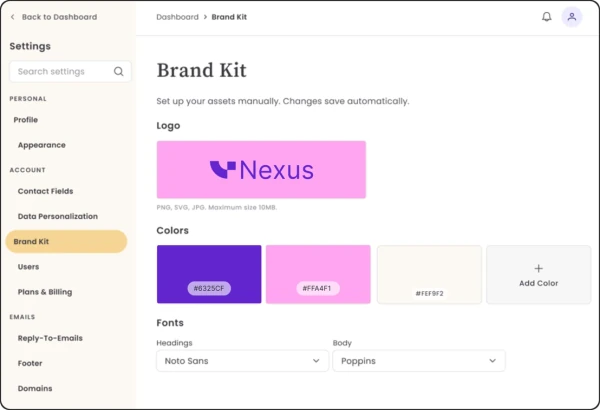
That’s where Benchmark Email’s Brand Kit comes in. Once you save your logo, brand colors, and fonts in your account settings, they’re automatically available every time you build. So while AI is helping you draft faster, your emails still look unmistakably like you.
Generative AI is a genuine productivity tool for email marketers, not a replacement for strategy, voice, or judgment. Use it to move faster and generate more options, and spend the time you save on the things AI can’t do: understanding your audience, making strategic decisions, and editing copy until it sounds like you at your best.
Frequently Asked Questions
Is generative AI good enough to replace an email copywriter?
Not yet and probably not entirely, even in the future. Generative AI excels at drafting and producing options quickly, but without significant human guidance, it lacks strategic judgment, audience knowledge, and a genuine brand voice. The best results come from using AI as a drafting partner and applying human expertise to editing, strategy, and final decisions.
What’s the best way to make AI-generated email copy sound like my brand?
Create a brand voice brief: a short document describing your tone, communication habits, things you always do, and things you never do. Include a sample paragraph from a past email you’re proud of. Paste this brief at the start of every AI prompt.
Which AI tools work well for writing marketing emails?
Several tools are worth trying, including ChatGPT (OpenAI), Claude (Anthropic), Gemini (Google), and email-specific AI tools built into marketing platforms. The best tool is the one you’ll actually use consistently with good prompting habits.
Can I use generative AI to personalize emails for different segments?
Yes, this is one of the strongest use cases for AI in email. With the right prompt and audience context, AI can quickly produce segment-specific email variations that speak to different customer needs or stages of the buying journey.
How does Benchmark Email help with AI-assisted email marketing?
Benchmark Email offers built-in AI writing assistance to help you draft and refine email content directly in the platform. Brand Kit keeps your visual branding consistent, no matter how quickly you produce emails.
About the Author:

Content Marketing Manager | Content marketing, inbound funnel, social media, email nurture | Natalie Slyman is an experienced Content Marketing Manager at Benchmark Email with a strong B2B background and a knack for crafting pillar content that boosts SEO and brand authority. She regularly shares actionable insights—from remote-work strategies to AI-powered content workflows—via blog posts and webinars tailored for busy marketers.