


How to Write Welcome Emails That Turn Subscribers into Leads
Key Takeaways
- High engagement: Welcome emails average a 50% open rate, and 76% of subscribers expect one immediately after signing up.
- Speed matters: Send your first welcome email within five minutes of signup for the strongest results.
- Keep it tight: Aim for 50–150 words, personalize where you can, and use a single, clear CTA.
- Build a sequence: A series of three to five emails that introduces your brand, delivers value, and builds toward an offer outperforms a single welcome message.
- Let behavior guide the series: AI-driven personalization can adjust send timing, content, and offers based on how each subscriber actually engages.
Welcome emails are an important part of any email marketing strategy. They’re your chance to show new subscribers that you’re personable, thoughtful, and ready to share something useful, so they look forward to your next message instead of tuning it out.
You may be surprised that welcome emails have an average open rate of 50%, well above most other email types. On top of that, 76% of people expect a welcome email right after signing up. Given that expectation, you can’t afford to skip it.
In this piece, we’ll walk through why welcome emails matter, how they fit into your onboarding series, and how to write one, including how AI personalization and behavioral triggers can make your welcome series sharper. Let’s jump in.
Why welcome emails work
Think of your welcome email as your first impression, and we all know there’s no redoing those. New subscribers just said “yes” to hearing from you. Now’s your chance to show them they made the right call. A great welcome email hooks them on your brand, sets the tone for what’s coming, and gives them a reason to keep opening your emails.
Done right, welcome emails meet subscribers where they are, set expectations, build interest in your brand, and open the door to a real relationship.
What are onboarding emails?
Onboarding emails are the unofficial welcome party you throw for new subscribers and leads who are trying out your product or service, in the hope that they stick around as paying customers.
Here’s the thing: subscribers have options. Lots of them. If your first impression falls flat, they’ll move on without a second thought. About 21% of users switch to a new app after just one session. Onboarding emails are your chance to show up, add value, and make staying a no-brainer.
Onboarding emails are sent immediately after someone signs up for your product or service. Their job? Help new users get up and running, understand what you offer, and start seeing value, fast.
Onboarding emails aim to:
- Welcome new users to your brand and product offering
- Help leads fall in love with your product or service
- Convert leads into customers
- Improve customer retention and loyalty
- Motivate your target audience to become loyal subscribers and soon, customers
How welcome emails fit into your onboarding series
The first email a new user gets as part of their onboarding sequence is the welcome email. It sets the tone for everything that follows. It’s your chance to engage the new user, make an impression, and encourage them to commit to the rest of the series.
Welcome email criteria
To get the most out of your onboarding email series, your welcome email should:
- Send out an email immediately after a new user signs up for your product or service.
- Welcome new users to your brand or service. Your subject line can do some of this work too.
- Be personalized to the new user.
- Introduce your brand and products: who you are, what you do, and why you do it.
- Set clear expectations for what the series covers, how often you’ll send, and what happens next.
What to write in welcome emails
Getting your onboarding series off to a strong start comes down to what you put in that first email. Some ideas:
- Confirm the subscription and thank the person for choosing your brand.
- Let them know how to manage their email preferences, and consider including a small gift for signing up.
- Set expectations by sharing what kind of content they’ll get and how often. Ask subscribers to whitelist you so future emails land in their inbox, and introduce your brand, website, and the person (or team) sending the newsletter.
- This is also a good place to mention your competitive advantage, share a quick testimonial or case study, address common objections, and invite people to follow you on social media.
What are welcome series emails and what is their goal?
Like onboarding emails, welcome series emails go out to new subscribers right after they sign up for your contact list. The difference is in the goal: onboarding emails support new users of your product or service, while welcome series emails nurture new subscribers into buying customers.
That’s why welcome series emails are also called nurture sequences. Their primary goal is converting leads into loyal, paying customers. Every brand structures its series a bit differently, but most follow a similar arc:
- Welcome — The first email welcomes the subscriber, thanks them for signing up, and outlines what to expect in future emails.
- Connect — Usually the second email, this one offers other ways to connect with your brand and explains how that benefits the subscriber.
- Learn — This email asks subscribers to share a bit more about themselves. Be upfront about what you’re collecting and why.
- Benefit — Typically the third or fourth email, this explains how your product solves your audience’s problems and nudges new subscribers toward a purchase.
- Offer — The final email in the sequence creates urgency and prompts your audience to act.
Good welcome email examples
Here are a few onboarding welcome emails worth learning from.
1. Canva
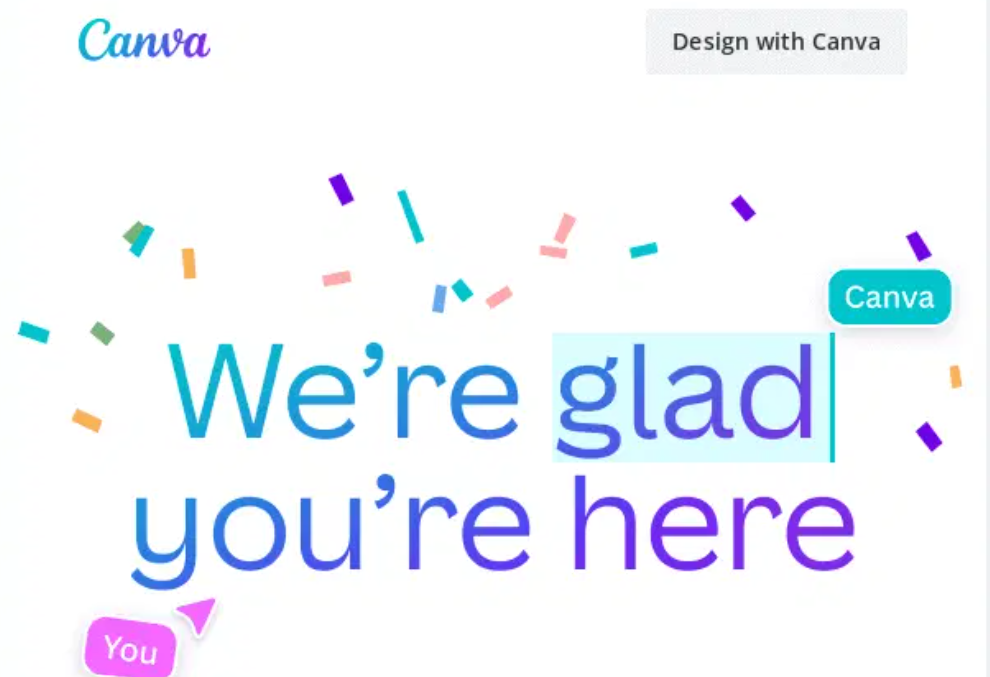
Canva’s welcome email leads with what you can immediately create: a bold visual and a tutorial CTA. It’s benefit-first, skips the feature list, and gets new users into the product in one click. Great example of solving a real problem (starting from a blank page) right from the welcome email.
2. Zapier
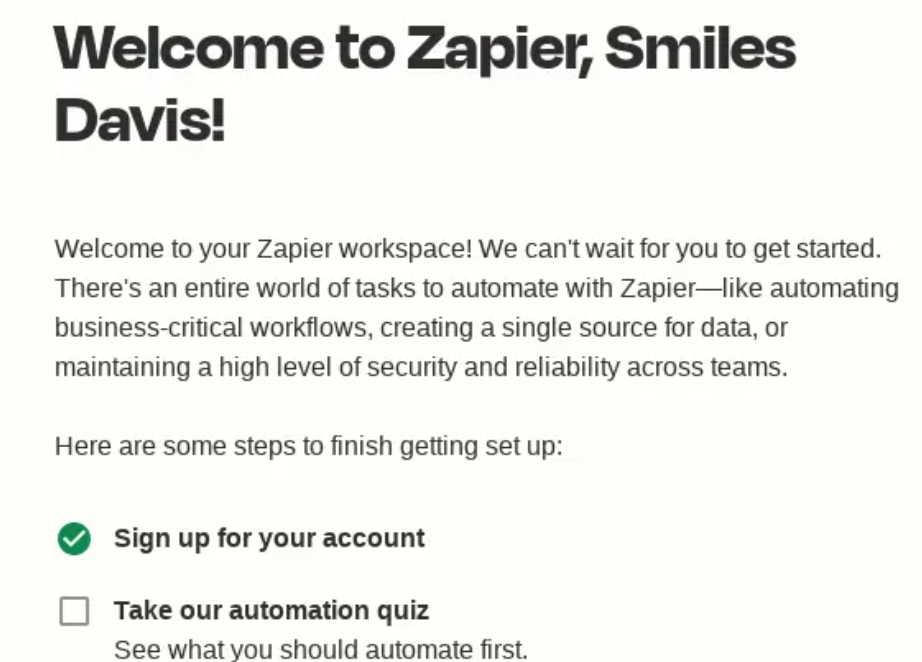
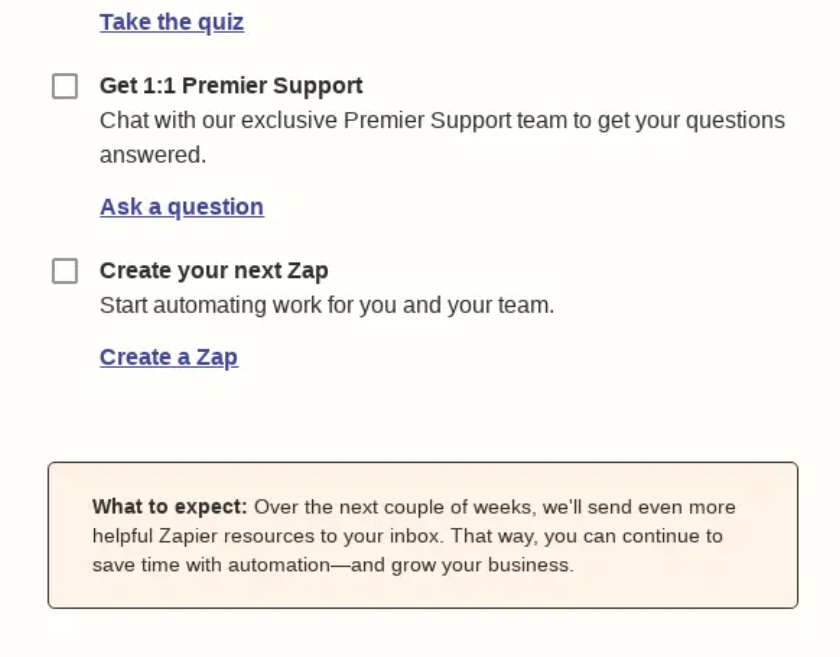
Zapier’s onboarding email welcomes new users and offers them a few options on what to learn more about, including setting up a new Zap. This helps those who are unsure what to do or how to use the platform effectively.
3. Duolingo
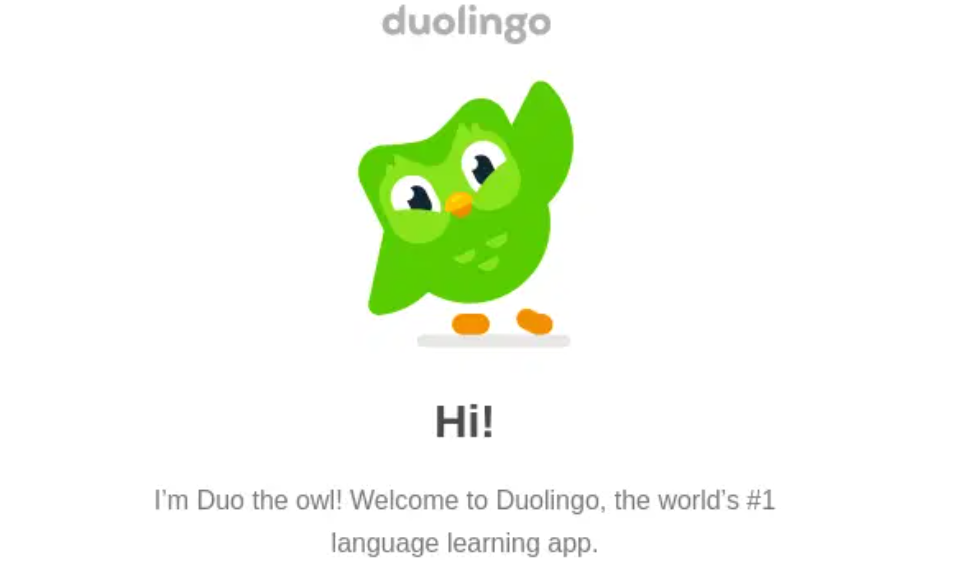
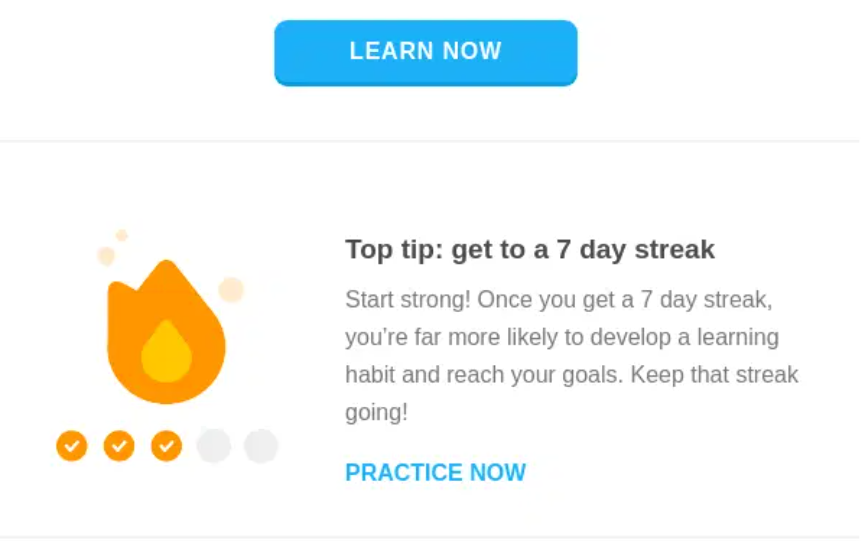

Duolingo’s welcome email gives users a personalized learning plan tailored to their preferences. This enables them to get the most out of their experience on this language-learning site.
Welcome email tips
As you welcome new subscribers and users, make sure your emails leave them feeling valued. Keep these in mind as you put your welcome emails together:
- Tell subscribers what to expect from future communications, and use clear, personalized subject lines to boost open rates.
- Keep the email short and to the point. If you promised something for signing up, deliver on it, and consider including a small gift to thank new subscribers.
- Ask them to add you to their contacts, so your messages keep landing in the inbox, and always include an unsubscribe link.
- Automate your welcome emails so they reach subscribers right when they’re waiting to hear from you.
- Tell a story about your brand, the “why” behind it, or how your product helped a customer solve a real problem.
- Include a clear, strong CTA and segment your audience so that different groups receive relevant welcome emails.
- Avoid overwhelming new subscribers with too many emails at once. Space out your series. And revisit your series regularly.
How to write welcome emails
A great welcome email goes beyond “thanks for being with us.” Your job is to make subscribers feel genuinely glad they joined. So write something genuine and useful. An email that reflects who you are as a brand and makes it crystal clear what subscribers get by sticking around. Here’s how:
1. Craft a subject line
When crafting your welcome email subject line, answer two questions: what’s the goal of this email, and what should subscribers do after reading it? Those two answers will help you write a subject line that’s concise, intriguing, and actionable.
Pro tips for stronger subject lines: add the recipient’s name for a personal touch, tease “a question inside” if it fits, mention what’s in it for them (a gift, discount, or bonus), and use emojis sparingly if they fit your brand voice. And avoid spam trigger words that could send your email to the junk folder before it’s even opened.
2. Keep brevity in mind
Your welcome email should be short and sweet. Aim for 50–150 words, lead with your most important point, and avoid sounding pushy. It’s about welcoming, not selling. If you’re a Benchmark user, Smart Text can help generate fresh copy and take some of the heavy lifting off your plate.
3. Use persuasive words
Every word in your email matters. The right words trigger emotion, build interest, and nudge readers to act, and the wrong ones do the opposite.
Use the most effective power words to drive engagement:
- Personal: you, your
- Urgency: now, limited
- Value: free, new, guarantee
- Courtesy: thank you
- Psychology: because, P.S.
A few rules of thumb: stick to words everyone knows, and avoid long sentences. Focus on what subscribers get, not just on telling them about yourself. Answer the “so what?” question. And read your email aloud before sending; if it doesn’t have a natural rhythm, edit until it does.
4. Format it for clarity
Both plain text and HTML formats work, depending on your audience. Plain text feels more like a message from a friend, while HTML is more colorful and visually engaging.
Most marketers lean toward templates with some color and visual structure, since images and color help readers process and remember information faster, and build a stronger brand impression. Ever notice how many brands lean on blue in their logos and email design? That’s color psychology at work: blue signals trust, efficiency, and integrity, exactly what you want a welcome email to communicate.
5. Add a clear CTA
A welcome email that’s just a “thank you” won’t do much work for you. You need a CTA, and a good one follows three rules. First, one email equals one CTA: make it obvious what you want subscribers to do next. Second, keep it concise and easy to find. Third, make it a button rather than a plain link (or at least give the link a contrasting color) to draw the eye.
5 secrets for welcome email optimization
Want to get more out of your welcome emails? Start with these five.
Send fast. New subscribers are waiting for confirmation the moment they hand over their email address; don’t make them wait.
| Email in sequence | Recommended timing |
| First welcome email | Within 5 minutes of signup |
| Second email | 1 day after signup |
| Third email | 2–3 days after signup |
Make it look like you. Use the same colors, fonts, and visual style as your website, so when subscribers open your welcome email, they immediately know it’s from you.
Watch how subscribers respond. Segmentation helps you see who opens your welcome emails, and resend to those who don’t, with a different subject line. It’s also worth sending a follow-up to non-openers, since the original may have landed in spam or rendered poorly.
Optimize your subject line. A welcome email’s job is clear, but a strong subject line still helps. A few options: “Welcome to Benchmark! What’s next?”, “Thanks for joining us. Here’s your 10% discount,” or “Welcome to the Benchmark family. Donuts inside.”
Protect your offers. Want to keep people from using throwaway email addresses to grab a discount? Set up a double opt-in: the first email asks subscribers to confirm their address, and the promo arrives only after they do.
Let AI personalize your welcome series
Everything above describes a welcome series you design once and send to everyone. AI personalization and behavioral triggers take it a step further, adjusting the experience for each subscriber based on what they actually do.
Dynamic send timing. Instead of a fixed “5 minutes, 1 day, 3 days” schedule for everyone, AI tools can adjust send times based on when individual subscribers are most likely to open email, without you having to build separate sequences for different time zones or habits.
Behavior-based branching. If a subscriber clicks through to a specific product category in your first welcome email, a behavioral trigger can send them a follow-up about that category instead of the generic next email in your sequence. Someone who doesn’t open the first email might automatically receive a different subject line on the second attempt.
Personalized content blocks. Rather than writing one version of email two for your entire list, AI personalization can swap in different product recommendations, offers, or messaging based on a subscriber’s signup source, browsing behavior, or stated interests, while keeping the overall template and brand voice consistent.
Smarter re-engagement. If a new subscriber goes quiet partway through your welcome series, behavioral triggers can detect the drop-off and adjust accordingly. Sending a check-in, offering something different, or simply pausing the sequence rather than continuing to send emails that aren’t landing.
The fundamentals don’t change: subscribers still need a clear, personable, well-timed welcome. But AI personalization means your welcome series can adapt to each subscriber’s behavior in real time, rather than treating every new contact exactly the same way.
Welcome email checklist
Here’s your checklist for writing welcome emails that engage subscribers, build loyalty, and turn them into leads:
- A familiar sender. A person or brand name subscribers will recognize.
- An appealing, relevant subject line and preheader. (Skipping the preheader is one of the most common email marketing mistakes.)
- Well-timed content: a greeting, a thank-you for signing up, and a brand introduction.
- Clearly stated benefits, so subscribers know what to expect going forward.
- Promo codes, bonuses, or discounts where relevant.
- A clear call to action.
- Social media buttons.
- A link or button to unsubscribe.
- If you’re sending a series, make sure it’s consistent and builds logically from one email to the next.
Welcome emails set the tone for everything that follows, and they’re one of the most valuable emails you’ll ever send. Use them to make a real connection, set the right expectations, and show new subscribers exactly why they made the right call. With a strong welcome series and a little help from personalization and behavioral triggers, you can turn new subscribers into loyal customers faster.
Frequently Asked Questions
How do I write a welcome email?
Start with a clear subject line, a warm greeting, and a thank-you for signing up. Briefly introduce your brand, highlight one key benefit subscribers can expect, and close with a single clear CTA. Keep the whole thing friendly and short.
What should I say in a welcome email?
A simple three-part framework works well: thank the subscriber for joining, tell them what value to expect going forward, and point them toward one next step. Aim for 50–150 words total.
What’s a good welcome message?
Here’s a template you can adapt:
Hi [Name], welcome to [Brand]! We’re glad you’re here. You’ll get [type of content] from us [frequency], and as a thank-you for signing up, here’s [offer or gift]. In the meantime, [CTA: explore, shop, follow us, etc.].
How do I write a formal welcome email?
Keep the structure similar. Greeting, thank-you, what to expect, and a CTA, but use a more professional tone throughout. Skip emojis and casual phrasing, use the subscriber’s full name if you have it, and sign off with a named contact or team rather than just a brand logo.
How soon should I send a welcome email after someone signs up?
As close to immediately as possible, ideally within five minutes. If you’re running a welcome series, space out the following emails by about a day, then two to three days after that.
About the Author:

Content Marketing Manager | Content marketing, inbound funnel, social media, email nurture | Natalie Slyman is an experienced Content Marketing Manager at Benchmark Email with a strong B2B background and a knack for crafting pillar content that boosts SEO and brand authority. She regularly shares actionable insights—from remote-work strategies to AI-powered content workflows—via blog posts and webinars tailored for busy marketers.