



Key Takeaways
- In Benchmark Email, you are required to send from a subdomain rather than your root domain.
- A subdomain (e.g., mktg.yourdomain.com) is a prefix added to your main domain that creates a separate sending identity.
- Sending from a subdomain protects your root domain’s reputation from the natural bounces, unsubscribes, and spam complaints that come with email marketing.
- A dedicated subdomain helps establish trust with inbox providers like Gmail and Yahoo, improving your overall deliverability.
- You can create multiple subdomains for different email types, such as newsletters, transactional emails, events, and more.
- The subdomain is set up directly in your Benchmark Email account, and verification requires adding DNS records to your domain host.
If you’re new to Benchmark Email, you may have noticed something that catches a lot of users off guard: you can’t send marketing emails from your main domain. For example, instead of sending as jess@benchmarkemail.com, you’d send as jess@mktg.benchmarkemail.com, or whatever subdomain you choose to set up.
At first, this feels like an extra hurdle. But it’s one of the smartest things you can do for your email program. Here’s why.
What is a subdomain, exactly?
An email subdomain is a prefix added to the front of your main (root) domain. It appears before the primary domain name, like this:
- mktg.benchmarkemail.com
- news.yourbusiness.com
- email.yourcompany.com
Subdomains let you create separate functions under the same root domain. You’ve probably encountered them without realizing it, such as blog.yourcompany.com, support.yourcompany.com, and app.yourcompany.com, which are all subdomains. In email marketing, a subdomain acts as a dedicated sending identity that’s separate from your main domain.
In Benchmark Email, you create your subdomain directly in your account. Once you’ve added it, Benchmark generates the DNS records you’ll need to verify it with your domain host. After verification, you’re ready to send.
Why Benchmark requires a subdomain
This isn’t just a technical preference. It’s a deliberate design decision built around protecting your business.
When you send email marketing campaigns, things happen that you can’t always control: some emails bounce, some recipients unsubscribe, and occasionally a spam complaint comes in. This is a normal part of email marketing. But if all of that activity is tied to your root domain (a.k.a. the same domain used for your company emails, login notifications, and purchase receipts), those signals start to affect your domain’s overall reputation with inbox providers like Gmail and Yahoo.
A damaged root domain reputation doesn’t just hurt your marketing emails. It can affect every email your business sends, including the transactional ones your customers depend on.
A subdomain solves this by creating a separate sending identity. Your marketing email reputation lives on the subdomain. Your root domain stays clean.
The real benefits of sending from a subdomain
1. It protects your main domain’s reputation
This is the big one. Your root domain (yourdomain.com) is the foundation of your entire email presence. Transactional emails, order confirmations, password resets, and shipping notifications depend on that domain having a solid reputation. By sending marketing emails from a subdomain, you create a firewall between your campaigns and your core business communications.
2. It improves email deliverability
Inbox providers like Gmail and Yahoo build trust with senders over time. A dedicated subdomain gives you a clean slate to establish a strong, consistent sending reputation. Over time, as you maintain good list hygiene and engagement rates, that subdomain reputation grows, and your emails are more likely to land in the inbox rather than the spam folder.
3. It lets you organize by use case
One subdomain doesn’t have to do everything. You can create separate subdomains for different types of emails, each building its own reputation:
- receipts.yourdomain.com: transactional emails
- news.yourdomain.com: newsletters
- events.yourdomain.com: event invitations
- rewards.yourdomain.com: loyalty program emails
This level of organization makes it easier to track performance by email type and protect each stream from the others.
4. It builds brand consistency
Your subdomain is yours to name. Choose something that fits your brand and sending purpose. Common options include email, mail, news, updates, info, or mktg. Whatever you pick, it becomes part of your sender identity and is visible in the from address that recipients see.
How to choose your subdomain
There’s no single right answer here, but a few principles help:
- Keep it recognizable. Subscribers who see news@news.yourdomain.com will still associate the email with your brand. An obscure subdomain can raise suspicion.
- Match it to the function. If you’re sending newsletters, news, or updates, makes sense. If you’re sending a mix of campaign types, something like email or mktg works well.
- Don’t reuse subdomains. Duplicate subdomains can cause delivery failures and trigger spam filters. Each subdomain should be unique.
- Keep it simple. Short, readable subdomains are easier for your team to remember and look cleaner in the from address.
Setting up your subdomain in Benchmark Email
The process is straightforward:
1. In your Benchmark Email account, navigate to the subdomain setup section.
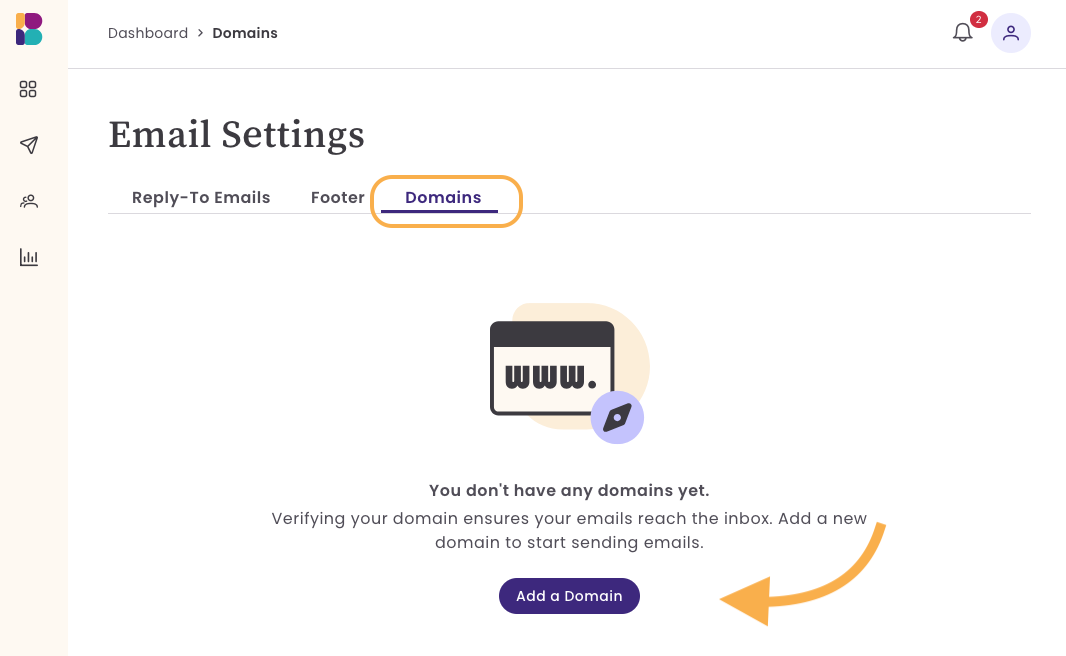
2. Enter the subdomain name you’ve chosen.
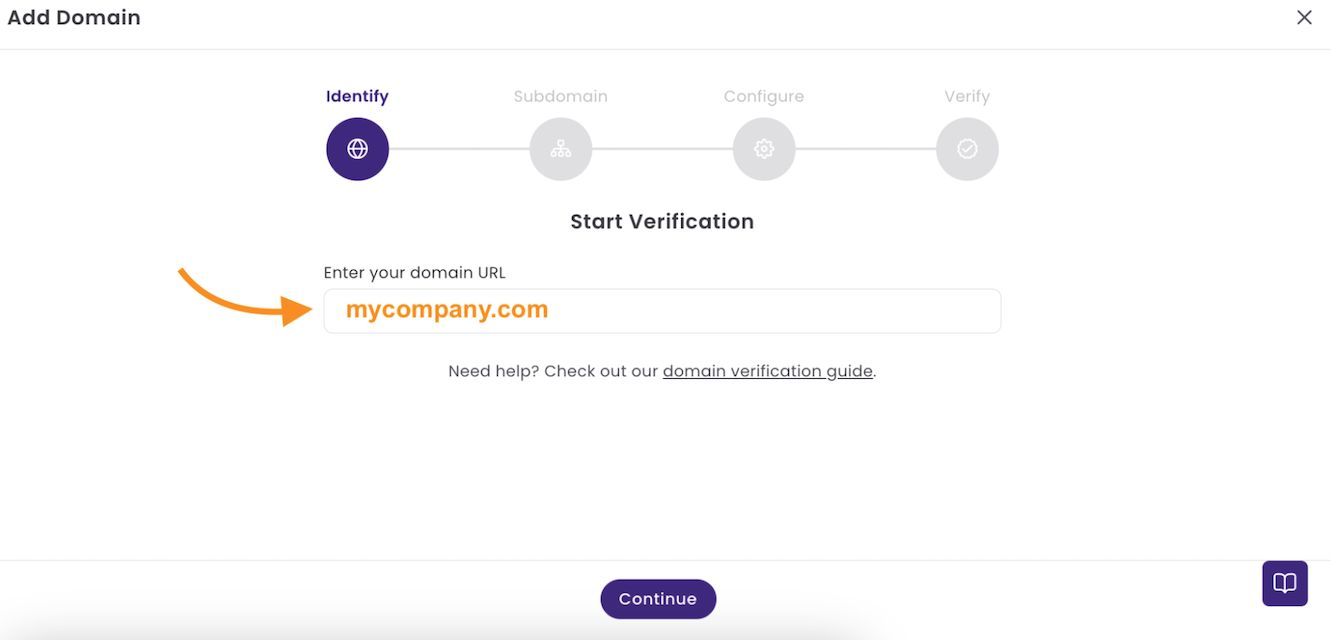

3. Benchmark will generate the DNS records needed to verify the subdomain.
4. Log in to your domain host (where your domain is registered) and add those DNS records to your DNS settings.

5. Once the records propagate and are verified, your subdomain is ready to send.

For a more detailed, step-by-step process, check out our Knowledge Base article.
Depending on your domain host, Benchmark uses either a multi-record or a single NS record for verification. If your domain host doesn’t support subdomain-level MX records, contact Benchmark’s support team, as there are alternative paths forward.
A note on what subdomains can and can’t do
A subdomain is a strong foundation, but it’s not a silver bullet. It doesn’t guarantee inbox placement on its own. What it does is give you the best possible starting point: a dedicated sending identity, separate from your root domain, with a clean reputation to build on.
To make the most of your subdomain, pair it with good list hygiene, consistent sending patterns, and relevant content that your subscribers actually want.
Frequently Asked Questions
Why can’t I just send from my main domain?
Sending from your root domain means any negative signals from your marketing campaigns, bounces, complaints, unsubscribes, directly impact your entire domain reputation. This can affect transactional emails like receipts and password resets, which your customers depend on. A subdomain keeps those risks contained.
Can I choose any subdomain name I want?
Yes. The subdomain can be anything you’d like: email, news, mktg, updates, and so on. Just make sure it’s recognizable to your subscribers and reflects the type of email you’re sending.
What do I need to do to verify my subdomain?
After creating your subdomain in Benchmark Email, you’ll receive a set of DNS records. You’ll need to log in to your domain host and add those records to your DNS settings. Once they’re saved and verified, your subdomain is active.
Can I have more than one subdomain?
Yes. You can have multiple subdomains for different sending purposes. However, the same subdomain should never be duplicated. Duplicate subdomains can cause delivery failures and trigger spam filters.
What if my domain host doesn’t support subdomain-level records?
Some domain hosts don’t support subdomain-level MX records, which means the verification process can fail. If this happens, reach out to Benchmark Email’s support team for guidance on how to proceed.
Does using a subdomain guarantee my emails will reach the inbox?
No. A subdomain is an important best practice, but inbox placement depends on many factors, like list quality, engagement rates, content relevance, and sending volume, among others. A subdomain gives you a strong foundation, but good sending habits are what build a lasting reputation.
About the Author:

High level marketing, technical email topics, email trends | Jessica Lunk is the VP of Growth Marketing at Benchmark Email, where she combines strategic flair with hands-on expertise to help busy marketers elevate their email game. Delivering timely insights on list hygiene, ROI, and email deliverability, she’s a go-to voice for practical marketing wisdom.