
Key Takeaways
- A content audit is one of the most effective ways to grow traffic, conversions, and sales, but it works best for sites that have been publishing content for a while. Newer or smaller sites are better served by applying audit principles to new content from the start.
- Starting with underperforming content that just needs a refresh is often faster and more rewarding than writing something brand new.
- Every audit should begin with a clear goal. Whether you’re focused on SEO, conversions, or social sharing, your goal shapes which metrics you track and how you interpret the data.
- Keyword cannibalization (two pages competing for the same terms) is a common issue audits uncover. Merging or redirecting conflicting pages can significantly improve search rankings.
- Most content audit frameworks sort pages into three buckets: keep, rework, or delete. Subcategories within “rework” help you prioritize the work more effectively.
- An audit is only as valuable as the action it produces. Prioritizing changes by expected ROI, assigning them to your team, and tracking them in a project management tool is what turns insights into results.
Whether it’s social media(opens in new tab), your website, or your content, implementing an audit at least once a year is a must.
Today, you’ll learn step-by-step how to do a content audit that works – and we know it works because we’ve grown our traffic 10x over the past few years using content. And in-depth audits have helped us get there.
In this guide, you’ll learn:
- Where to find your site’s content strengths
- Steps to repair content weaknesses
- How to improve website traffic, conversions, and sales
We’ll cover the exact steps to take for a content audit that works. But first, is an audit right for you?
Should you do a content audit?
Not every website needs an audit.
If you’re just starting or have a small site with a few dozen pages, a content audit won’t make a big difference. Instead, use the principles behind an audit to create high-performing content.
But for most sites, an audit makes sense. If you’ve published content for years or just haven’t taken a closer look at what you’re doing and what you’ve been doing, a content audit is the best way to start.
An audit will save you time and money by indicating where to focus your efforts. Not all content is created equal, and starting with low-hanging fruit pays big dividends.
Content that’s just barely underperforming can be fast and easy to fix—and will deliver better results than you’ll ever see writing something from scratch.
Finally, a content audit can help you pinpoint problems before it’s too late. It’s always easier to refresh a declining page before it dips lower in search results. The longer you wait, the more work it’ll take to revive.
Case study: How a content audit helped us boost results
Recently, we did a content audit here at Nextiva.
The research showed that our original page on cloud contact centers needed some work.
 Source: Nextiva Cloud Contact Center old blog copy
It was conflicting with another page on cloud-based call centers(opens in new tab). Both were ranking for similar keywords—which Google never likes. This was a classic case of keyword cannibalization where search engines tend to pick one result, and it’s not always the one you want to rank.
To tackle this – we decided to merge the two pages into a newer, more in-depth keyword-optimized page on cloud contact centers(opens in new tab).
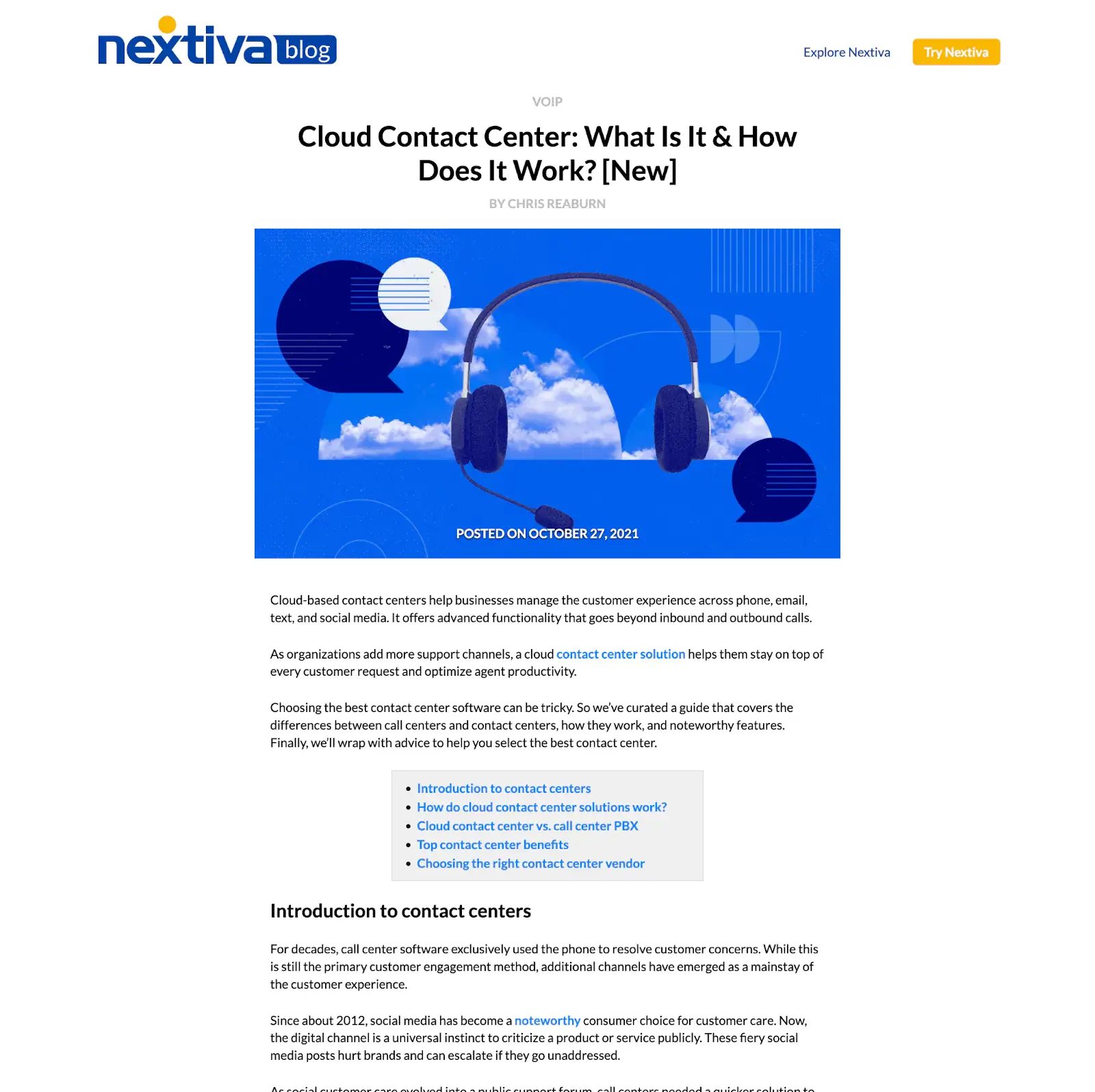
And the old page on call centers? We removed it from the website completely. Now it redirects to the updated page.
If we hadn’t done the audit, we wouldn’t have seen the opportunity to combine the pages into a single resource to outperform what came before.
You’ll find similar discoveries during your audit. Now, let’s dive into what you need to know to start.
How to audit your content the right way
There’s a right and wrong way to do your content audit.
If you don’t have a plan going in, you can get lost in irrelevant data and draw incorrect conclusions. Here’s the right way to set up your audit.
1. Create a goal
A content audit starts like anything else—by understanding your goal.
Before you dive into the data, think about your goals for the audit. An audit to attract a new type of customer will be very different from an audit for growing your current email list.
Some of the most common goals include:
SEO. Many sites have a blog primarily to drive search engine traffic. Improving content to attract more search engine visitors is one of the most common goals for a content audit.
Boost conversions. Traffic is nice, but getting visitors to take action will help your business the most. You can focus your audit on optimizing for email subscribers, demo requests, successful checkouts, free trial users, or something else.
Social sharing. Everyone wants to go viral, and great content can be the best way to do it. Your audit can focus on getting more social media engagement and sharing.
Something else. Every business has a unique set of challenges. If you’re pivoting your product, entering a new market segment, finding investors, attracting talent, or something else, a content audit can help.
You have a goal. Now we need to define how we measure it.
2. Decide metrics
With your goal in mind, decide how you’ll measure results.
There are two kinds of metrics—leading indicators you control directly and lagging indicators that you don’t.
Audits tend to focus on leading indicators (like content length) to improve lagging indicators (like more traffic).
While you can choose as many metrics as you like, keeping it to just a few typically delivers better results. Focus on the one or two numbers that most closely correlate to your goal.
Some of the most important metrics to look at include:
- Title tags
- Meta description
- Inclusion of keywords
- Type of keyword (buying intent, branded, etc.)
- Content length
- Graphics or media
- Page load time
- Organic traffic
- Bounce rate
- Conversion rate
- Page load time
- Keyword ranking(opens in new tab)
- Duplicate content
- Stage in buyer’s journey
- Target persona
We’ll use those numbers to analyze everything on the site.
3. Create inventory
Now we’re going to catalog everything on your site.
Well, actually—it might not be everything. Now is the time to decide which parts you want to leave out of your content audit.
For example, you might not want to include your customer support hub or landing pages for paid ads. Decide if there are any exceptions before creating the inventory.
Once you’ve decided what to focus on, create a spreadsheet. We’ll add every single page to this sheet along with the data we collect from different tools.
The tools you use depend on your needs and budget(opens in new tab).
The most common SEO tools(opens in new tab) (opens in new tab)(opens in new tab) include Ahrefs(opens in new tab), Semrush(opens in new tab), Screaming Frog(opens in new tab), and (opens in new tab)MarketMuse, along with free tools like Google Search Console and Bing Webmaster Tools.
For user engagement, collect data from tools like Google Analytics, Hotjar, or Crazy Egg.
You may also consider manually reviewing pages for readability, plagiarism, or spelling and grammar.
You’ll also want to create categories for each page manually—for example, mark pages as blog posts, videos, gated content, infographics, and more.
We’ve collected it all. Now it’s time to see what we’ve got.
4. Analyze content
It’s easy to get overwhelmed with so much data in a single spreadsheet.
But in this step, we’ll find patterns and make sense of what we’ve recorded.
Most content audits move everything into one of three buckets—content that works, content that needs rework, and content to delete.
But your buckets might be different, depending on your objectives. For example, many audits end with most content in the “needs rework” category. Creating subcategories can help you make changes later.
Review your goals and metrics, and decide how you’d like to categorize the content.
Start with the metrics that matter most and look for patterns. For example, are your top-performing content pieces all on a single topic? Do longer articles tend to convert better?
This stage takes the longest, but it’s time well spent. By the end, you’ll have placed every piece of content in a bucket with further recommendations.
But a content analysis by itself won’t make your content better. Taking action is what matters most.
5. Create next steps
You’ve decided what matters most.
You’ve categorized every piece of content.
The final part of your content audit is making sure your hard work pays off. By the end of this step, you’ll want to create a clear set of next steps for you and your team to follow.
Start by looking at value. Where are your biggest opportunities? What content could deliver outsized results with just a little work? Which pieces won’t offer much improvement despite needing a complete overhaul?
Rank pieces by their expected return on investment. Even if you’re doing the edits yourself, your time is valuable, and you should start where it counts.
You’ll then want to create a specific list of changes for each piece. Most likely, you’ll find a few areas of improvement. Write them down.
And finally, assign the tasks to your team in your project management tool. Organize tasks by priority, set deadlines, and follow up to make sure the work gets done—from planning to execution. It’s useful to create a roadmap timeline graph in Excel (opens in new tab) to keep track of who completed which task and the outcome of the effort.
It’s the only way to make sure your content audit pays off.
The bottom line on successful content audits
Whether you’re running a professional blog(opens in new tab) with thousands of articles or a small niche site, a content audit can help.
There’s no faster way to see what’s missing and where you can improve. More importantly, you can develop a plan of action to focus on the most immediate results.
With a clear goal and a set of metrics, you can quickly identify which areas you need to improve and how to deliver better results for your site.
Now you have a step-by-step plan for running an effective content audit.
How will you use it to boost your site’s results(opens in new tab)?
Frequently Asked Questions
How do I know if my site needs a content audit?
If your site has been publishing content for years, has pages that have never been reviewed, or you’ve noticed declining traffic, a content audit is a smart next step. Small or brand-new sites with only a few dozen pages are generally better off focusing that energy on creating strong content from the start.
How often should I do a content audit?
At minimum, once a year. For larger sites or those in competitive niches, a more frequent review cycle (every six months) can help you catch declining pages before they slip too far in search rankings.
What tools do I need to run a content audit?
The most commonly used SEO tools include Ahrefs, Semrush, Screaming Frog, and MarketMuse. For free options, Google Search Console and Bing Webmaster Tools are solid starting points. For user behavior data, Google Analytics, Hotjar, or Crazy Egg can round out your picture.
What is keyword cannibalization, and why does it matter?
Keyword cannibalization happens when two pages on your site compete for the same search terms. Search engines tend to choose one, and it may not be the page you want ranking. An audit helps you spot these conflicts so you can merge, redirect, or differentiate the pages.
What should I do with content that isn’t performing well?
It depends on the reason. Some content just needs a refresh: updated information, stronger keywords, or better structure. Other pages may need a complete rewrite. And some content is best removed entirely, with a redirect pointing visitors to a more relevant page. Your audit metrics will guide which path makes sense for each piece.
How do I prioritize which content to fix first?
Focus on content that is close to performing well but needs a small push. Quick wins like updating outdated stats, improving a title tag, or adding internal links often deliver faster results than a full overhaul of a struggling page. Rank your fixes by expected return on investment and work from the top down.